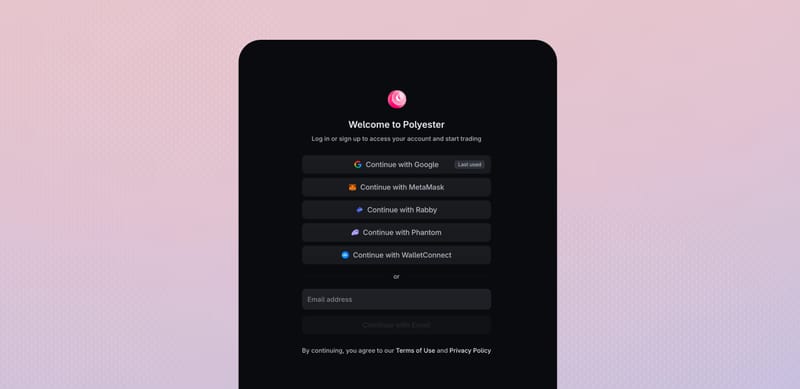
Your Polyester account is controlled by one non-custodial owner wallet. You can create an embedded wallet with Google or email, or connect a wallet you already control through MetaMask, Rabby, Phantom, or WalletConnect.
Overview
The wallet address becomes the owner credential for your account. Your first successful sign-in creates a Main Account, and the same owner wallet opens it on future visits.
Every Main Account and Subaccount also receives its own Safe smart account on Polyester Chain. The owner wallet controls that smart account, so protecting the wallet protects access to your Polyester account and funds.
Polyester does not create a separate username and password. You can add a username from Profile when that field is available, but it is display information rather than a sign-in credential.
Create your account
The options on the Create Account screen work for both account creation and future sign-ins. Choose a method you can protect and recover over the long term. Each path creates or opens the Main Account tied to that owner wallet.
Google and email create an embedded non-custodial owner wallet through Turnkey. Your Google identity or email is how you return to that wallet. Use the same identity every time. A different Google account or email address can create or open a different Polyester account.
Choose Google or Email
Verify the identity
Open your Main Account
Turnkey stores the embedded wallet's private key in encrypted form and decrypts it only inside secure enclaves for authorized signing. Polyester does not receive the raw private key during account use.
You can export the private key through the Polyester interface. The key is revealed only during that export, and Polyester is not notified when you request it.
Use MetaMask, Rabby, or Phantom if you already control a browser wallet. The active address becomes the owner credential for your Main Account. Private keys and recovery stay inside the selected wallet. Return with the same wallet and address.
Choose a wallet
Confirm the address
Sign in
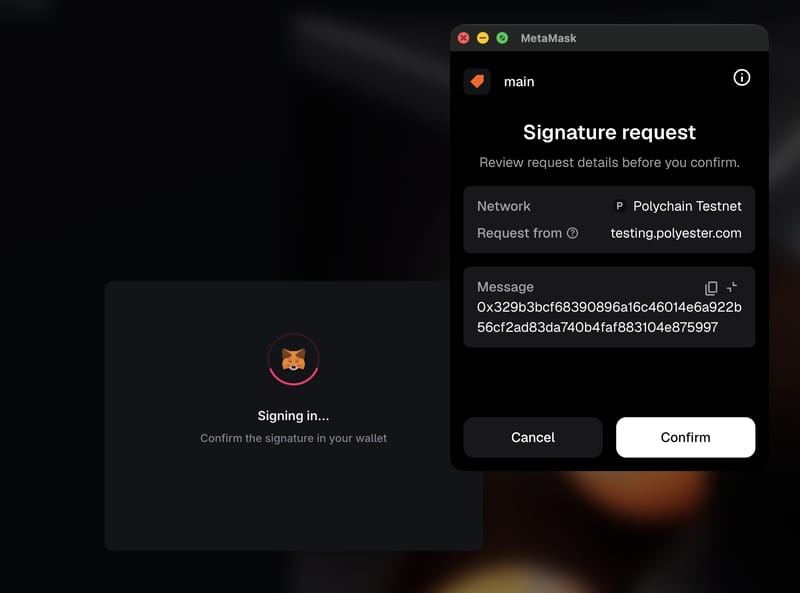
The authentication signature proves control of the wallet address. It does not transfer an Asset, approve spending, or require a seed phrase or private key.
Signing in is an off-chain action and costs no gas. It also does not deploy the Safe smart account. Polyester deploys the Safe with the account's first Deposit on Polyester Chain.
WalletConnect connects another compatible desktop or mobile wallet. Approve the connection in that wallet, then sign in with its active address. Private keys stay in the wallet you connect.
Choose WalletConnect
Approve the connection
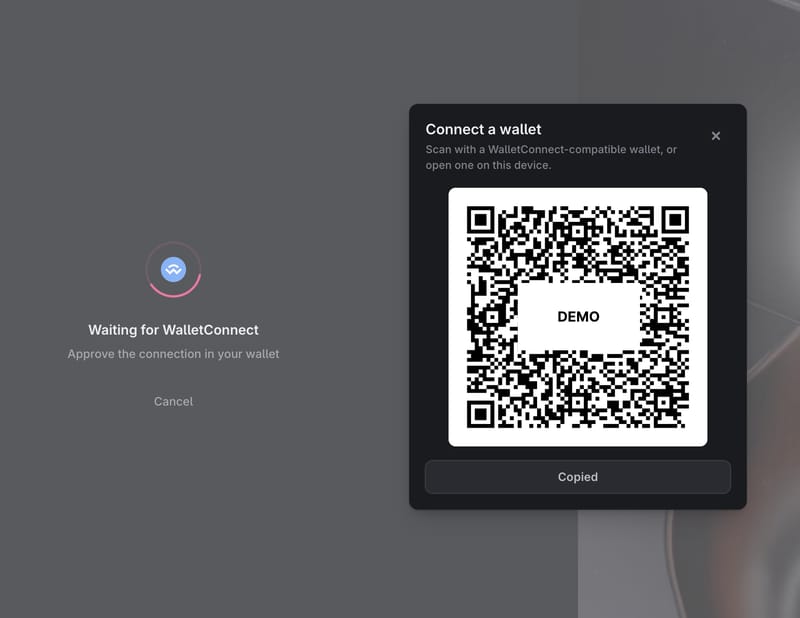
Sign in
The authentication signature proves control of the wallet address. It does not transfer an Asset, approve spending, or require a seed phrase or private key.
Signing in is an off-chain action and costs no gas. It also does not deploy the Safe smart account. Polyester deploys the Safe with the account's first Deposit on Polyester Chain.
Confirm your Main Account
Account creation is complete when Polyester opens your Main Account. The account menu shows the current owner identity and Safe smart account, so you can confirm which account is active.
Open the account menu
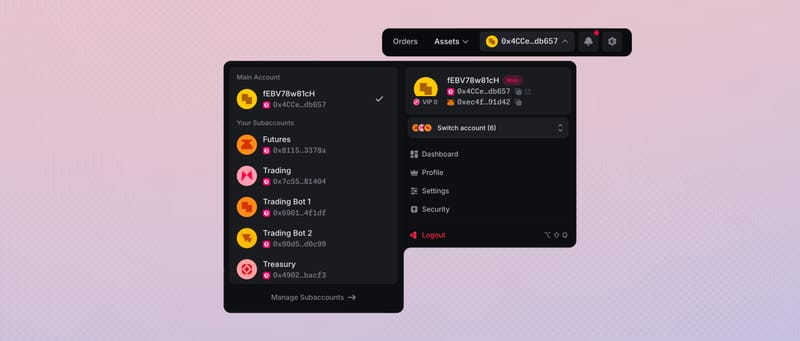
View the smart account address
Confirm the account
Protect your owner wallet
The owner wallet controls your Main Account and authorizes its chain-visible activity. Polyester does not hold its private keys and cannot replace the wallet's own recovery method.
| Sign-in path | Where the private key is protected | What the user must protect |
|---|---|---|
| MetaMask, Rabby, or Phantom | Inside the selected wallet | The wallet, device access, and its recovery keys |
| WalletConnect | Inside the wallet connected through WalletConnect | The connected wallet, device access, and its recovery keys |
| Google or email | Stored as an encrypted private key by Turnkey and used inside secure enclaves | The exact Google identity or mailbox and its recovery methods |
Add MFA and recovery methods before funding the account. Polyester MFA protects sensitive account actions, but it does not replace the owner wallet or its recovery method.
Your original owner credential remains tied to the Main Account. Polyester does not currently provide a general flow to link another sign-in method, replace or unlink the owner credential, or close or delete the Main Account. Protect and reuse the exact method selected during account creation.
FAQ
No. Polyester does not require identity verification to use the platform. All you (or your AI agent) need is a supported crypto wallet, Google account, or email to create an account, deposit, trade, and withdraw.
The Create Account screen supports MetaMask, Rabby, and Phantom directly. WalletConnect can connect another compatible desktop or mobile wallet. The selected wallet address becomes the owner credential for the Main Account. Learn about account creation.
Turnkey creates and secures the embedded non-custodial owner wallet. Google verifies your selected Google account, while email sign-in verifies access to your selected inbox. You use that Turnkey wallet to create or sign back into your Polyester Main Account. Learn about account creation.
You own your Polyester smart account and control the wallet that authorizes it. Polyester does not hold or control that wallet’s private keys. Your deposited assets remain yours, while their custody and movement are handled through Polyester’s account systems and Zipper. This applies whether you connect an existing wallet or use an embedded wallet created through Google or email.
With MetaMask, Rabby, Phantom, or WalletConnect, the private keys remain with you and your connected wallet. With Google or email, Turnkey stores the encrypted private key and decrypts it only inside secure enclaves for authorized signing. Polyester does not receive the raw private key in either path. Learn about account creation.
Yes. Every Main Account and Subaccount receives its own smart account. This smart account represents your Polyester account on-chain, while your owner credentials control it. Learn about account creation.
Not currently. Your Polyester account is tied to its owner wallet. Signing in with a different wallet address, Google account, or email address will sign you into a different account instead of adding another way to access the existing one.
Yes. You can export the seed phrase or private key for the embedded wallet created by Turnkey when you signed up with Google or email. Exporting it is not required to use Polyester. Keep it as a secure offline backup. Anyone with this information can control your Turnkey wallet and therefore your Polyester account. So never share it, including with support.