Polyester Scan shows two connected asset types. A Zipped Asset, or zAsset, represents one asset from one source chain. A Unified Asset, or uAsset, brings compatible Zipped Assets together as one account-facing balance.
For example, USDT deposited from Ethereum and USDT deposited from Solana create separate Zipped Assets. When both routes map to Unified USDT, you see one USDT balance in your Polyester account.
Browse Unified Assets
The Unified Assets directory lists each Unified Asset with its supported chains, Unified Asset ID, Ledger ID, decimals, and combined Zipped Asset supply.
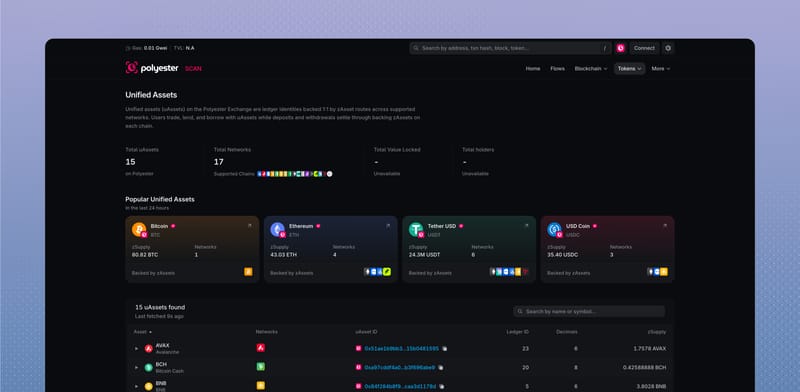
Expand a row to see every route behind that asset. Each route includes its source chain, Polyester contract, and source-chain contract. Native assets show Native instead of a source contract address.
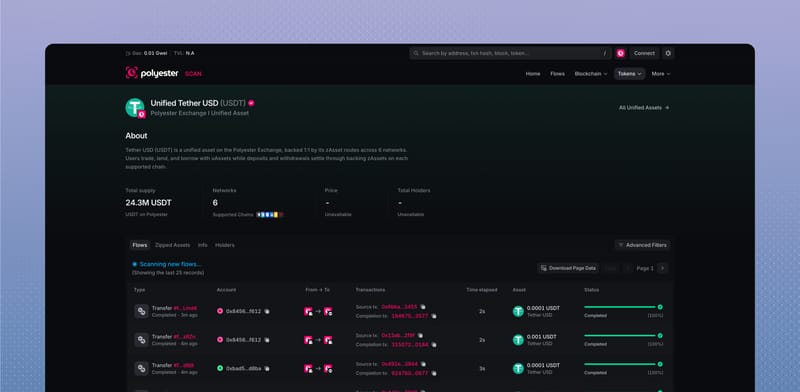
On a Unified Asset page, you can use:
- Flows to see related deposits, withdrawals, and transfers
- Zipped Assets to compare the routes that contribute to the balance
- Info to see IDs, decimals, and route metadata
- Holders when holder information is available.
Browse a Zipped Asset
Open a Zipped Asset from the Tokens directory, a transfer, a Flow, or a Unified Asset page. Its detail page connects the route's source chain and source asset to the corresponding contract on Polyester Chain.
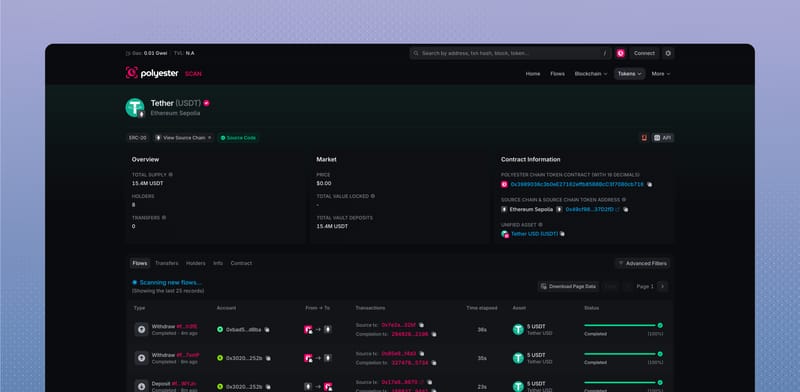
It can also show transfers, holders, flows, supply, and contract information. The supply shown here belongs to this individual source-chain route. A Verified badge means Scan recognizes the asset from Polyester's configured catalog.
Use Asset Flows to follow a specific movement, or Tokens & Chains to explore the routes available in Scan.