An Asset Flow connects every stage of one deposit, withdrawal, or internal transfer. Instead of making you follow several separate records, Polyester Scan brings the movement, status, amounts, and linked transactions into one journey.
The three Flow types
| Flow | What it follows |
|---|---|
| Deposit | An asset moving from an external chain into your Polyester account |
| Withdrawal | An asset moving from Polyester to an address on a supported external chain |
| Internal transfer | An asset moving between supported Polyester accounts or balance areas |
A Flow is not one blockchain transaction. It can link an external transaction, one or more Polyester Chain transactions, validator activity, and a private ledger settlement into one understandable record.
Find a Flow
Open the Flows directory to browse recent activity. You can filter by Flow type, account, chain, transaction, asset, or status.
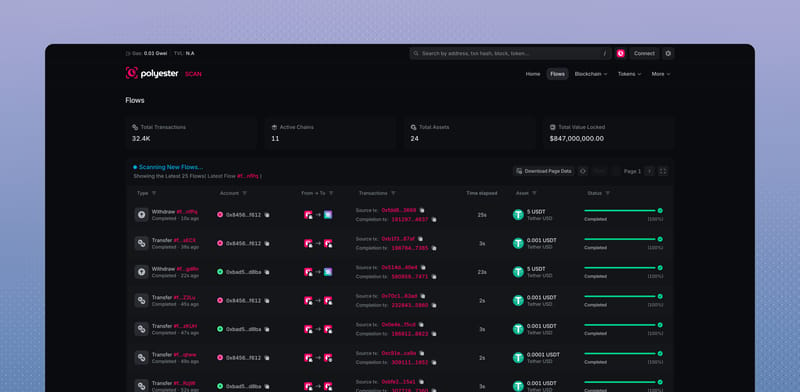
Each row shows the direction, asset, linked records, elapsed time, current stage, and overall status. Open a row to see its complete Summary and Journey.
Read the Summary and Journey
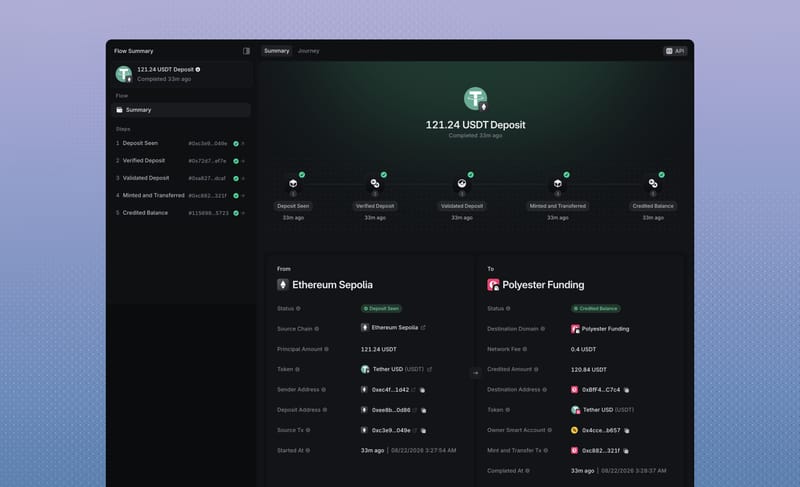
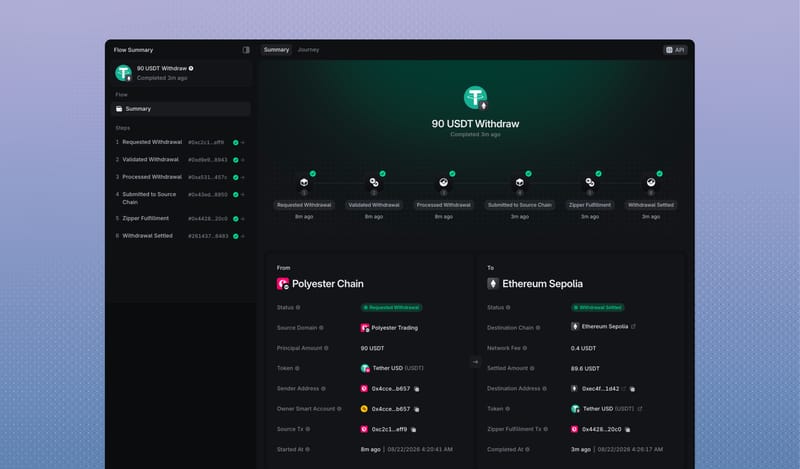
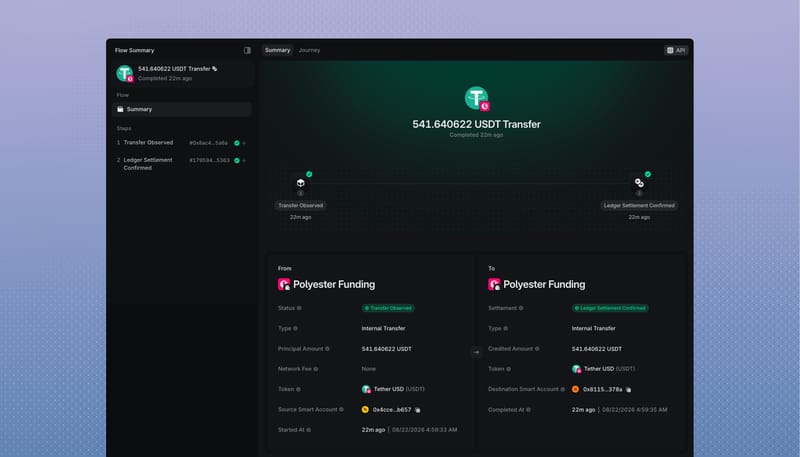
The Summary shows what moved and where it went. It includes the asset, principal amount, fee, final amount, source, destination, account, and available transaction links.
The Journey shows how the movement progressed. Depending on the Flow, it can include:
- source-chain confirmations
- Zipper validator approval
- a Zipped Asset mint or burn
- a Funding or Trading balance update
- destination-chain delivery.
Deposit and withdrawal Flows contain more stages because they cross networks. An internal transfer usually contains only the observed transfer and its ledger settlement.
Understand the status
| Status | Meaning |
|---|---|
| Pending | The Flow is still moving through its required stages |
| Completed | The expected final stage has finished |
| Failed or Dropped | Processing ended without the intended completion |
| Refunded | The Flow ended through its supported refund path |
The progress bar shows how far the Flow has moved through its lifecycle. A terminal Flow can show 100% whether it completed, failed, or refunded, so the written status remains the clearest result.
Follow the linked records
Transaction links take you to the public record for that stage. External-chain links open the relevant network explorer, while Polyester Chain links remain in Polyester Scan.
You can also open the related account, Zipped Asset, Unified Asset, or source chain directly from the Flow. This makes the Flow the easiest starting point when you want to understand the complete journey of one asset movement.