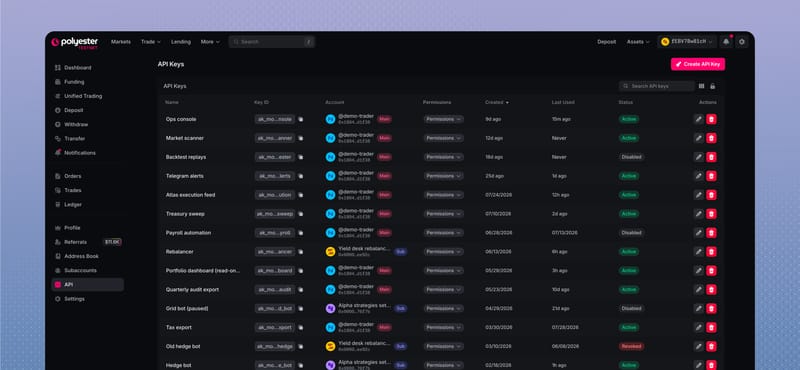
An API key lets software access one Polyester Main Account or Subaccount. You choose whether the key can view balances, trade, or move funds, and you can disable or revoke it at any time.
Open API Keys to create a key and manage its access.
For request signing, authentication headers, replay protection, and implementation examples, use Ed25519 API Keys in the Developer Docs.
How an API key works
Polyester API keys use an Ed25519 keypair:
- The private key stays with your software and signs each request.
- The public key lets Polyester verify the signature.
- The Key ID tells Polyester which public key and permissions apply.
- The account limits the key to one Main Account or Subaccount.
- The permissions control which actions the key can perform.
Polyester never stores or redisplays the private key.
Choose how to create the key
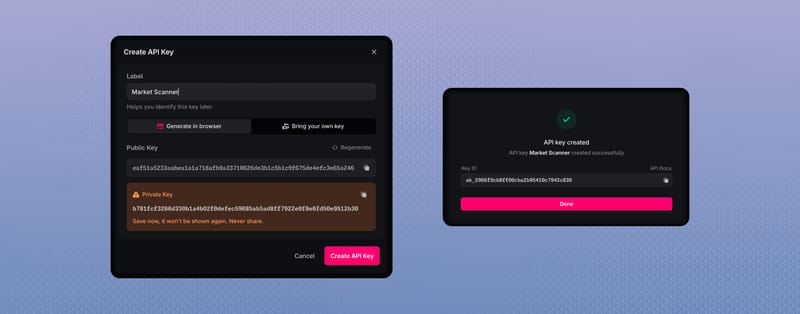
Your browser creates the public and private key. Save the private key securely before completing creation; it is shown only once.
Create the Ed25519 keypair in your own security system and provide only the public key to Polyester. The private key never leaves your system.
Create an API key
Choose the account
Select the Main Account or Subaccount the software should use.
Name the key
Use a label that identifies the application and environment, such as 'Reporting production' or 'Market maker testnet'.
Create or provide the keypair
Generate it in the browser or enter a public key you created elsewhere. Save the private key before continuing.
Choose its access
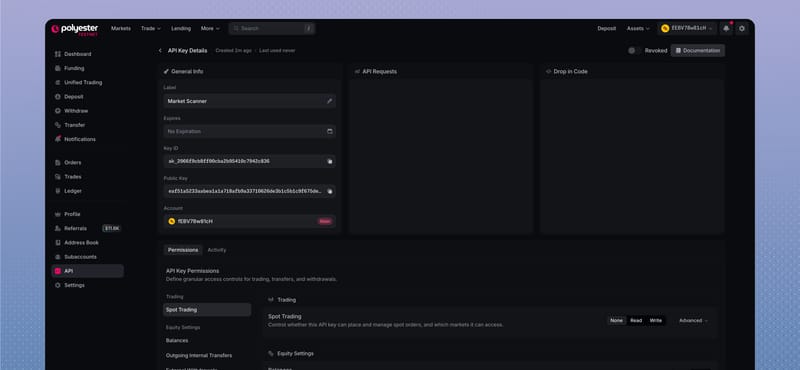
Enable only the data and actions the application needs. Add an expiry and IP whitelist when appropriate.
Save the Key ID
Store the Key ID with the private key and application configuration, then test one low-risk request.
Choose permissions and limits
- Spot Trading can allow market data access, order access, or order placement for all or selected markets.
- Balances lets the key view private account balances.
- Outgoing Internal Transfers can allow internal transfer access.
- External Withdrawals can allow withdrawal access.
- Address Book can allow the key read or write access to saved internal accounts and external addresses.
- IP whitelist limits requests to specified IP addresses or network ranges.
The most restrictive account, Subaccount, API-key, whitelist, and endpoint rule always applies.
Manage and replace keys
The API Keys page shows each key's account, permissions, creation time, last use, status, and expiry.
- Disable pauses a key and can be reversed.
- Revoke permanently stops the key.
- Replace a key by creating and testing a new one before revoking the old one.
If a key is no longer needed or its private key may be exposed, revoke it instead of leaving it active.
Developer guides
Use the Developer Docs for request signing and API integration: