Footer settings control the market ticker along the bottom of the trading screen. Choose which markets it follows, how quickly it moves, and how much information it shows.
Open Footer Settings from the trading footer or use Quick Settings to show or hide it.
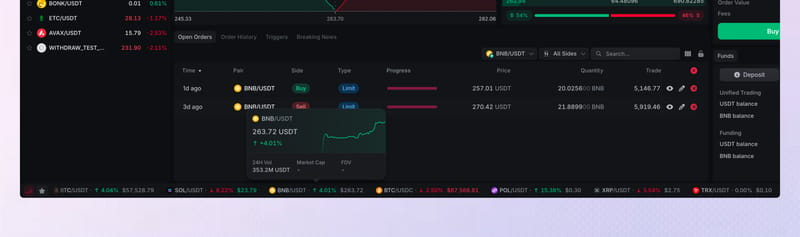
Footer
Turn Footer on when you want the market ticker visible. Turn it off when you want more room for the trading workspace.










Ticker category
Ticker category selects the group shown in the footer, such as Favorites, Popular, Gainers, Losers, or New listed.
Choose Favorites when you want the footer to follow the markets you selected yourself.
Scroll settings
Pause the ticker or choose a slow, medium, or fast scrolling speed. Changing the speed does not affect the live prices inside it.
Icon labels
Turn Icon labels on to show text next to ticker icons.
Ticker settings
Show or hide the pair name, token icon, 24-hour change, and price for each market. Keep at least the pair name or token icon visible so each market is easy to identify.
Footer choices save automatically in the current browser.