The Funding Account is where you manage Assets before they enter Trading and after they leave it. It receives deposits, holds available balances, and supports transfers and withdrawals on Polyester Chain.
Each Main Account and Subaccount has its own Funding Account. Switching the active account changes the balances and activity you see, so check the selected account first if an expected Asset appears to be missing.
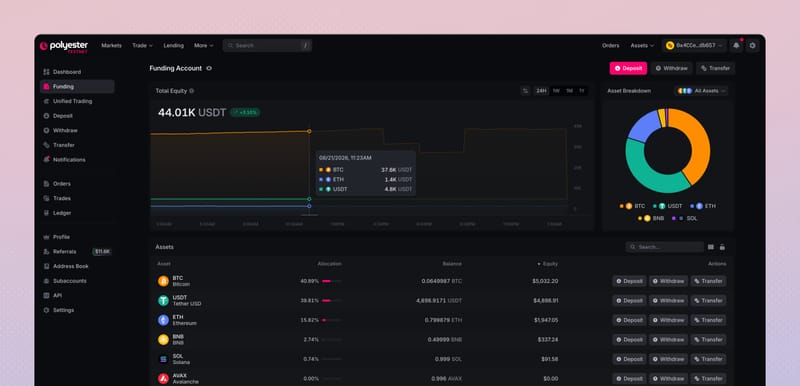
What the Funding Account does
Funding keeps the movement of Assets simple while preserving the on-chain records underneath each balance.
- Holds balances on-chain. Funding Account balances and their activity are recorded on Polyester Chain.
- Combines Zipped Assets into Unified Assets. Compatible Zipped Assets contribute to one Unified Asset balance, even when they entered through different source chains.
- Keeps accounts separate. Every Main Account and Subaccount has its own balances, history, and security controls.
- Keeps Assets outside Lending risk. Assets in Funding do not count as collateral and are not exposed to liquidation. After you transfer an eligible Asset to Trading and use it as collateral, it can support borrowing and may be liquidated if the account no longer meets its margin requirements.
How Assets reach Funding
When you make a deposit, Polyester handles the cross-chain steps as part of one connected flow:
Deposit an Asset
Zipper verifies the deposit
Zipper sends the Asset to Funding
Choose what happens next
Polyester automatically handles zipping and unzipping as part of deposits and withdrawals. You choose the Asset, chain, amount, and destination when required; there is no separate wrapping step to manage.
Suppose your account receives 100  USDT through
  Ethereum and 50 USDT through
  Solana .
Zipper creates 100 Ethereum zUSDT and 50 Solana zUSDT. Funding will display them as one 150 USDT Unified Asset balance because Polyester explicitly maps both routes to the same Asset.
The two Zipped Asset supplies remain separate. Each keeps its own source-chain backing and withdrawal route even though the Funding Account presents one balance for everyday use.
By contrast, Coinbase BTC (cbBTC) on  Base and native
  BTC from the
  Bitcoin Network remain separate Assets and appear as separate balances. Polyester does not merge Assets simply because one is designed to track the value of another.
Unification is based on Polyester's configured route mapping, not on a matching ticker. A native, wrapped, or externally bridged token only joins a Unified Asset when Polyester explicitly recognizes that route as an equivalent Asset.
Read your balance
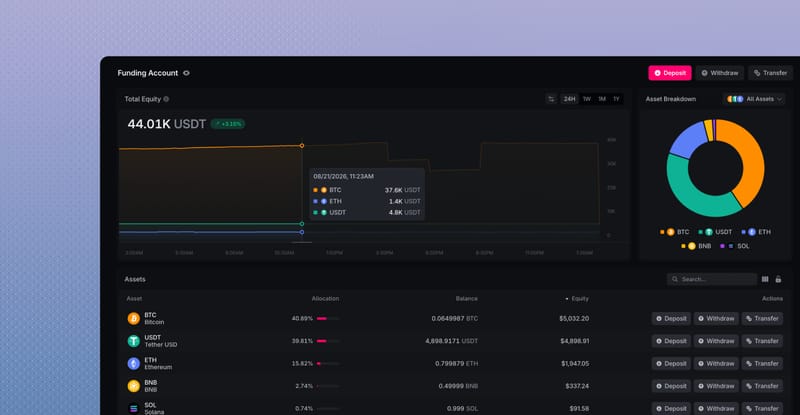
The Assets table shows the Unified Asset balances held in the selected Funding Account. Use Balance to see how much of each Unified Asset is available, and use Equity and Allocation to understand its estimated value within the account.
| Field | What it tells you |
|---|---|
| Total Equity | The estimated current value of all Funding balances in the selected account, calculated from their Index Prices. |
| Balance History | How that estimated value changed during the selected period. Index Price changes can move the chart without moving an Asset. |
| Balance | The quantity of the Unified Asset held in Funding. |
| Equity | The estimated current value of that Asset balance, calculated from its Index Price. |
| Allocation | The Asset's share of the total displayed Funding equity. |
| Actions | The deposit, withdrawal, or transfer actions currently available for that Asset. |
Move Assets from Funding
An available Funding balance can move in four ways:
- Deposit an Asset. Bring a supported Asset into the selected account from an external chain.
- Transfer to another Polyester account. Send an available balance to another eligible account without creating a new Zipped Asset or changing its external backing.
- Transfer to Trading. Make a balance available for spot Orders and for use as eligible collateral when borrowing.
- Withdraw an Asset. Send a balance to an available Asset route and destination chain.
Deposits and withdrawals cross between Polyester and an external chain through Zipper. Transfers between Funding, Trading, and other Polyester accounts stay inside Polyester.
Transfer between Funding and Trading
Use Transfer to make an available Funding balance usable for trading, borrowing, or margin. Reverse the direction when an unused Trading balance should return to Funding.
Open Transfer
Keep Between My Accounts selected and review any values already shown in the form.
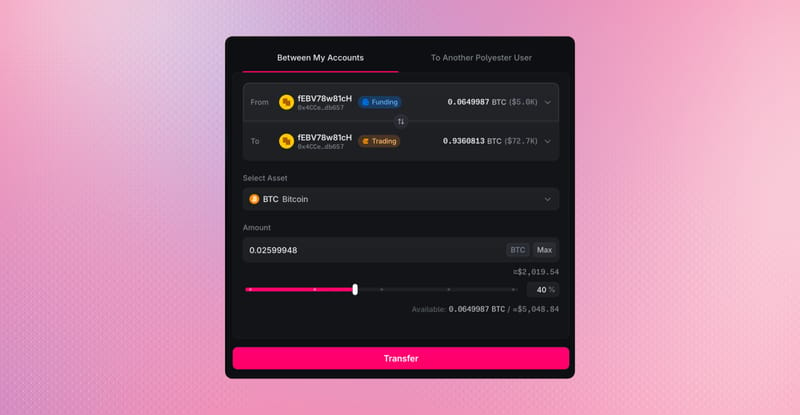
Choose the source and destination
Select Funding as the source and Unified Trading as the destination to move an Asset into Trading. Reverse them to return an available Trading balance to Funding. Use the same Main Account or Subaccount on both sides.
Choose the Asset and amount
Select an Asset held by the source account and enter an amount within its Available Balance.
Review and transfer
Confirm the account, direction, Asset, and amount, then select Transfer once. Wait for Transfer History and both balances to show the result before using the balance or trying again.
Learn the difference between funding and trading.
Funding and Trading can show the same Unified Asset, but they serve different purposes. Funding is the on-chain balance area for deposits, transfers, and withdrawals. Trading is the private, low-latency balance area used by Orders, reservations, Fills, fees, and eligible collateral for borrowing.
| Compare | Funding Account | Trading Account |
|---|---|---|
| Purpose | Deposits, withdrawals, and transfers | Trading, borrowing, and margin |
| Recorded on | Polyester Chain | PolyEngine Ledger |
| Publicly seen | Yes | No |
| Lending | Not supported | Supported for eligible Assets |
Moving an Asset into Trading does not bridge it, change its owner, create another Zipped Asset, or move the underlying Zipped Asset out of Funding. It changes which part of the same Polyester account can use the corresponding Unified Asset balance.
Funding-to-Trading transfers settle as one Polyester Chain transaction and normally appear in Trading almost immediately. Once the transfer completes, the updated Trading balance is ready to use.
Funding and Lending
Assets held in Funding are outside the Lending risk engine. They do not count as collateral, increase borrowing power, affect account health, or become available for liquidation.
To use an eligible Asset as Lending collateral, transfer it to the Unified Trading Account. Until then, the balance remains available in Funding for transfers and withdrawals.
Secure Your Funding Account
Security controls apply to the active Main Account or Subaccount. MFA can confirm protected actions, while on-chain whitelists can limit where Assets are allowed to move.
- The external withdrawal whitelist restricts withdrawals to approved external addresses when enabled.
- The internal transfer whitelist restricts transfers to approved Polyester accounts when enabled.
- MFA confirms the person approving a protected action. It does not replace either whitelist.
Use Address Book & Whitelists to manage approved destinations. Read Secure Your Account for an overview of MFA, the Guard Signer, and your owner credential.
FAQ
Your Funding Account holds on-chain balances for deposits, withdrawals, and transfers. Your Unified Trading Account manages the balances used for orders, fills, and borrowing. Assets kept in Funding are not used for lending or as collateral and are not exposed to liquidation. You stay in control of how much you move between Trading and Funding. Internal transfers happen in seconds.