Use the Deposit page to bring a supported Asset from an external Network into the selected Polyester account. Choose the receiving account, Asset, and Network, then follow the current route instructions shown by Polyester.
Zipper handles the Deposit Flow automatically. You send the external Asset once, and Polyester tracks the transfer until the matching Unified Asset balance is ready in Funding or Unified Trading.
Make a deposit
Open Deposit from the Main Account or Subaccount that should receive the balance. Switching the active account changes the deposit details and history you see. A new deposit address may take a few seconds to appear while Polyester prepares it for that account and Network.
Choose the receiving account
Select the Main Account or Subaccount that should own the deposited balance, then open Deposit. 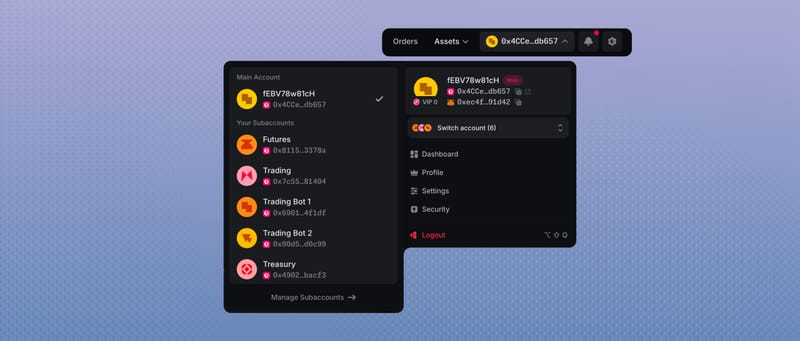
Choose the Asset and Network
Select the Asset you want to deposit and the Network from which you will send it. Polyester will show the route currently available for that combination.
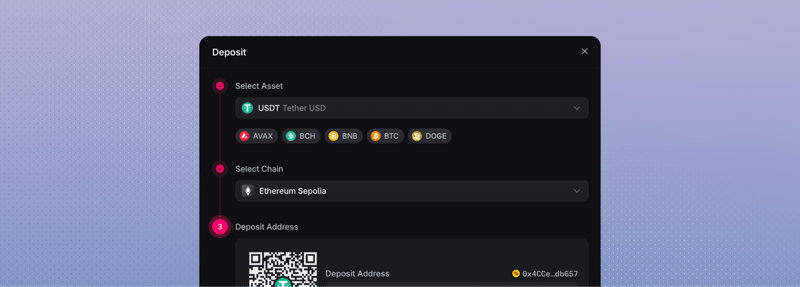 Selecting USDT as the token and Ethereum as the network
Review and send
Review the address, Asset contract, minimum, confirmations, estimated time, and any fee shown. Include the memo or destination tag when the route requires one. Copy the complete address or scan its QR code, then approve the transfer in the sending wallet.
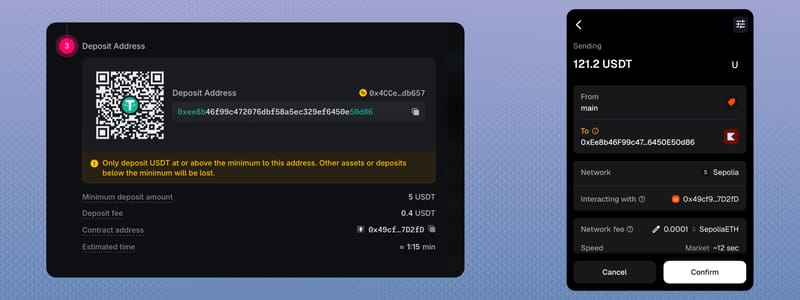 Using MetaMask to send 121.24 USDT to the deposit address
Watch the in-progress deposit
After you send, Polyester shows an indication in the top bar and a toast. Open either one to follow Deposit Seen while it observes the transfer and source-chain confirmations.
If you miss both, open Account/Deposit to see the deposit.
 Watching an in-progress USDT deposit after it is seen on chain
Confirm the credited balance
When Credit Balance completes, check the credited amount and the account where the Unified Asset became available.
USDT Deposited via Ethereum
Completed

Started
What happens after you send
The source transaction begins the Deposit Flow. Polyester then moves it through five stages:
Deposit Seen
Polyester detects the source transfer and starts the Deposit Flow. The deposit record then tracks confirmations against the live Network requirement for that route.
Verified Deposit
Zipper checks that the source transaction matches the selected Asset, Network, amount, and receiving account. It then opens a deposit request for that transfer.
Validated Deposit
Independent Zipper validators review the same evidence and the current route policy. The flow continues only after they approve the request.
Minted and Transferred
Zipper mints the route-specific Zipped Asset on Polyester Chain. It sends that Asset to Funding as on-chain backing.
Credited Balance
Polyester credits the matching Unified Asset to the selected account. The balance appears in Funding or Unified Trading based on Default Deposit Destination.
You can see more details on Polyester Scan.
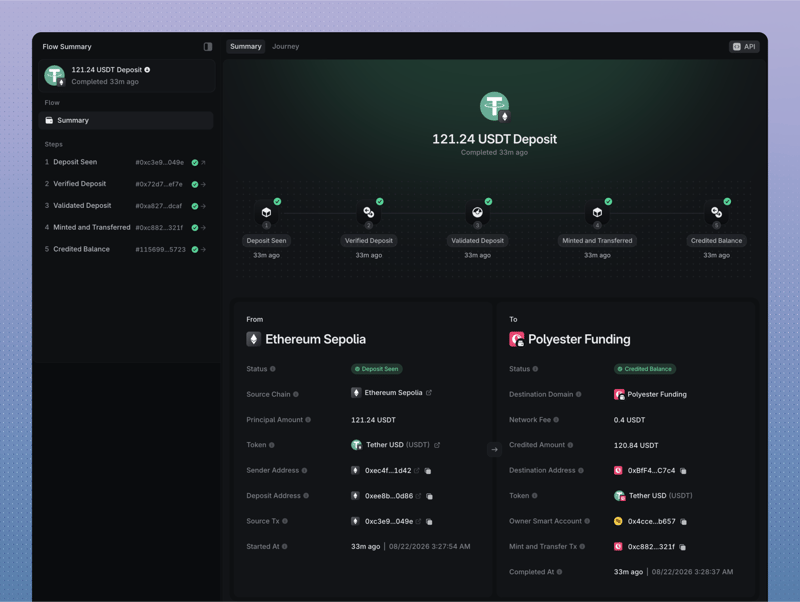 Viewing a completed 121.24 USDT Deposit Flow on Polyester Scan
You never need to wrap the Asset yourself or hold the Zipped Asset in an external wallet. The Deposit Flow handles those steps between the source Network and your Polyester account.
Confirmation requirements can change with the Network, transfer amount, and current conditions. Follow the live requirement in the deposit record instead of relying on a previous transfer.
Track each deposit
Every transfer has its own deposit record, even when several deposits use the same active address. Follow each record until it reaches a completed state rather than treating one completed credit as confirmation that every transfer arrived.
Open Account/Deposit to view the deposits data table.
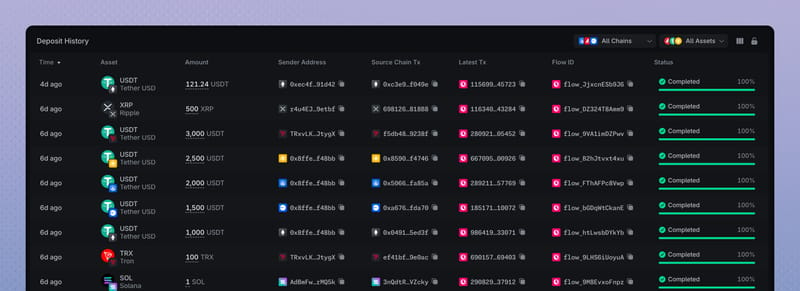 In view (Account/Deposit) data table
After completion, compare the credited amount with the deposit record and check its destination. If the balance appears in Unified Trading, you do not need to transfer it there again.
Choose where new deposits go
Default Deposit Destination controls where the Unified Asset becomes available after a Deposit Flow completes. The setting applies separately to each Main Account and Subaccount.
- Funding Account. Keep new balances ready for transfers and withdrawals, or move them to Trading later.
- Unified Trading Account. Make new balances available for spot trading and for use as eligible collateral when borrowing.
Open Settings/Security for the active account. Under Fund Movement, set Default Deposit Destination to Funding or Unified Trading. This is an authorized on-chain account setting, not a browser preference.
Fund Movement
Control deposit routing and restrict where withdrawals and transfers can go.
Automatically credit to your selected account when you deposit
The setting changes where the Unified Asset is credited. It does not change the external Asset, source Network, Zipped Asset backing, or Polyester account that owns the balance.
If automatic routing to Unified Trading fails, Polyester leaves the completed credit in Funding. Check the deposit record and both balance areas before submitting a separate transfer.
Fees and timing
A deposit can involve two separate costs:
- Network transaction cost. The sending wallet pays the cost of broadcasting the transfer on the source Network.
- Polyester route fee. The Deposit page shows any fee that applies to the selected route and the expected credited amount.
The estimated completion time is guidance, not a guarantee. Actual timing depends on the source Network, confirmation requirement, route health, Zipper verification, and Polyester processing.
FAQ
No. Your connected wallet lets you sign in and authorize a transaction, but it does not hold the assets you deposit in Polyester. Your original assets are held through Zipper’s custody system, while the corresponding balances appear in your Funding Account or Unified Trading Account. You manage those balances through Polyester.
Yes. You can send supported assets from another exchange to your Polyester deposit address. Make sure the withdrawal network on the sending exchange matches the deposit network you selected in Polyester. For example, if you select ETH on Base in Polyester, withdraw ETH over the Base network from the other exchange. Copy the address from Polyester’s Deposit screen and include any memo or destination tag shown.
Open Deposit, choose the asset and network, and copy your unique deposit address. You must send your funds to the address shown on this screen, using the selected network. Do not use your non-custodial wallet address or your Polyester smart wallet address as the deposit destination. Sending funds to either of those addresses does not move them into Zipper or fund your exchange account. Once your deposit is processed, the funds will appear in your Funding Account or Unified Trading Account, depending on your Default Deposit Destination setting.
No. Completed deposits can be credited to either your Funding Account or Unified Trading Account. For your Main Account, choose the default destination under Deposit Routing on the Security settings page. For a Subaccount, open Subaccounts, select the Subaccount, and go to its Security tab to find Deposit Routing.
Yes. Your deposit address is assigned to you and does not rotate for that specific asset and network. We still recommend visiting the Deposit page regularly to confirm that your saved details are correct.
Deposit times depend on the blockchain you are depositing from and its current network conditions. Your deposit will be credited after the required confirmations have been completed. An estimated deposit time is shown during the deposit flow.
The source network can show a transaction as confirmed before it meets Polyester’s confirmation requirements. Zipper must then verify and process the deposit before the balance is credited. Confirmation requirements vary with the network, transfer amount, and current conditions. You can track your deposit’s progress in the deposit history table on the Deposit page, or view the full flow in Polyester Scan.
Any applicable deposit fee is deducted before the deposit is credited to your account. It is charged in the asset you deposit, separately from the network fee paid by the sending wallet. Check the deposit history table on the Deposit page for the deposit amount, fee, and final credited amount.
Contact support through the chat icon in Polyester. Include your transaction ID, the asset and network used, the amount, the receiving address, and any memo or destination tag. Do not send another transfer to try to fix the first one. The team can investigate, but recovery is not guaranteed.
Yes, and this makes Polyester an effective bridge for moving assets between supported networks. You can deposit an asset through one supported network and withdraw it through another without making a trade. For example, you can deposit USDC on Ethereum and withdraw USDC on Solana when both networks are available and funded.