Quick Swap converts one supported asset into another and delivers the result to a wallet you choose. You select what to send, what to receive, and where the output should go. Polyester handles the deposit, conversion through its order books, and delivery on the destination chain.
You do not need to move funds into a regular Polyester Trading Account or place an order yourself. Quick Swap presents the complete route and quote before you send the input asset.
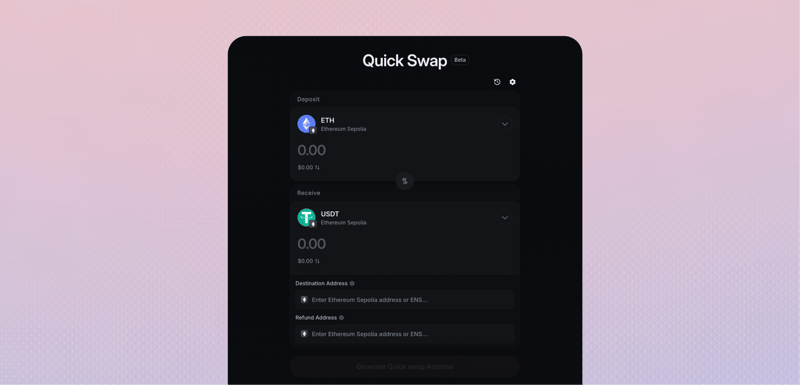
Swap and deliver an asset
One Quick Swap connects the input transfer, protected order-book conversion, and output delivery.
Choose what you want to send and receive
Enter the amount and destination
Review the quote
Send the input asset
Follow the conversion and delivery
How Quick Swap works
Each Quick Swap is one connected request. Polyester assigns deposit instructions to that request, identifies the incoming transfer, and makes the input balance available only for the quoted conversion.
The conversion executes against liquidity in Polyester's dedicated order book for the selected Pair. Quick Swap does not use an AMM, bridge pool, or liquidity from another exchange. Price protection in the quote limits the result you agree to accept.
After the conversion settles, Polyester sends the output asset through the selected destination route. The swap is complete when the output reaches its final delivery state, not merely when the input transfer confirms or the trade fills.
Review your quote
The quote brings the important choices and costs together before you send funds:
- You send shows the input asset, source chain, and exact amount.
- You receive shows the output asset, destination chain, and protected output.
- Rate and price protection show how the conversion is priced and the minimum acceptable result.
- Fees itemize the trading, network, and service or partner charges included in the swap.
- Destination shows the complete receiving address and any required memo or tag.
- Expiration shows how long the quote and its deposit instructions remain valid.
The displayed output is a quote until the conversion executes. Market movement can change the final result within the accepted protection; it cannot make the completed output lower than the quote's protected amount.
Quick Swap settings
Quick Swap settings belong to the individual quote, so the choices remain visible together when you review the swap.
Assets, chains, and amount
Choose the asset and chain you are sending from, the asset and chain you want to receive, and the amount to convert. Available combinations and amount limits come from the current routes and order-book liquidity.
Price protection
Price protection defines the lowest output the swap can accept as the market order executes. Stronger protection narrows the acceptable result, while a wider range gives the order more room to complete as the market moves.
Destination and recovery
The destination identifies where the converted asset should arrive. When a separate recovery address is required, it applies to the original input asset and source chain; it does not replace the output destination.
Quote expiration
The expiration keeps the route, price protection, and fees tied to current conditions. Start the transfer while the quote is active. If it expires before you send, request a new quote instead of reusing the old instructions.
Track your swap
The swap record keeps the input transaction, conversion, fees, output transaction, and final result together under one Quick Swap ID. Use it to follow progress after leaving the page or closing the browser.
An input transaction can be confirmed while the conversion or delivery is still processing. Continue following the same record until it shows the final output amount and destination result.