Polyester Scan connects each asset on Polyester Chain to its contract and, for Zipped Assets, its source chain. This makes it easy to see which route an asset represents and where its public activity appears.
Choose what to browse
| Page | What it shows |
|---|---|
| Tokens | ERC-20 tokens and configured Zipped Asset routes |
| Token Transfers | Recent transfers, mints, and burns |
| Unified Assets | The account-facing assets shared across compatible routes |
| Chains | Source chains, asset coverage, confirmation rules, and chain details |
Read a token page
The Tokens directory shows the token name and symbol, source chain, Polyester contract, source-chain contract, type, price, supply, and TVL when that data is available.
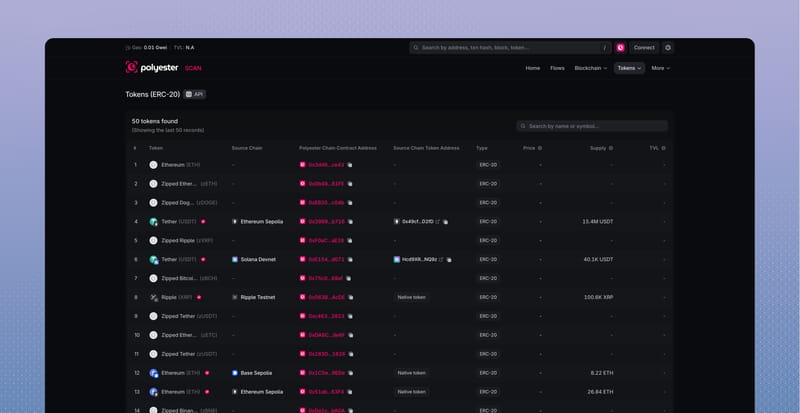
A configured Zipped Asset includes a Verified badge and route information. Open it to see:
- its source chain and source asset
- its contract on Polyester Chain
- the Unified Asset it maps to
- transfers, holders, and related Flows
- public contract information.
A generic ERC-20 token can still appear in Scan, but it does not include the configured route or Unified Asset relationship.
Read token transfers
The Token Transfers page shows the transaction, method, block, sender, recipient, amount, and token for each indexed ERC-20 action.
Open a transaction to see whether the action was a transfer, mint, or burn and how it fits into the rest of the transaction. If it belongs to a supported cross-chain movement, the related Asset Flow provides the complete journey.
Read a chain page
The Chains directory lists the external chains configured for Zipper routes. It includes each chain's ID, native asset, number of configured routes, required confirmations, and estimated confirmation time.
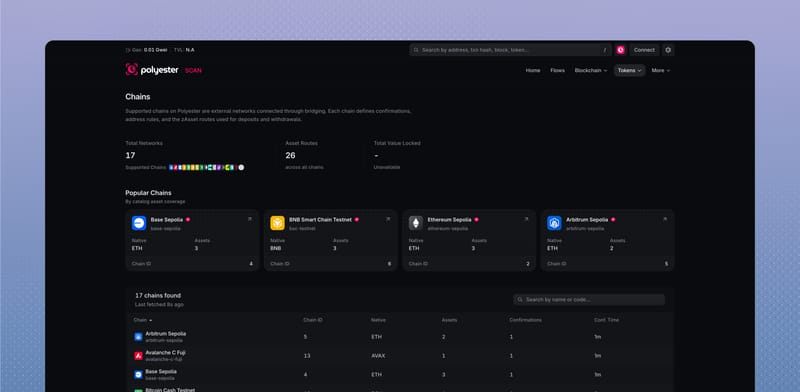
Open a chain to see its:
- related deposit and withdrawal Flows
- configured Zipped Assets
- chain and native-asset identifiers
- address format
- external explorer link.
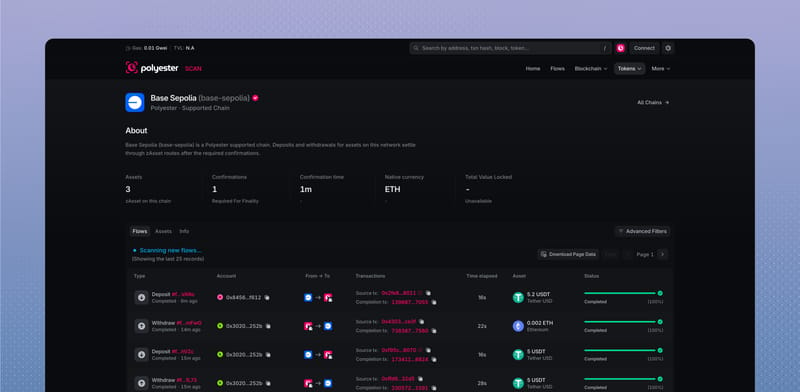
Confirmation time is an estimate based on the configured number of blocks and typical block time. It can change with the source chain.
Connect a chain to an asset
The source chain and source contract identify what arrives from the external chain. The Polyester contract identifies the matching Zipped Asset on Polyester Chain. The Unified Asset link shows the balance identity that you use inside your Polyester account.
Use zAssets & uAssets for a closer look at that relationship.