Polyester Scan organizes the public activity recorded on Polyester Chain. You can browse recent blocks and transactions or open a specific hash, block, or address to see its details.
Browse chain records
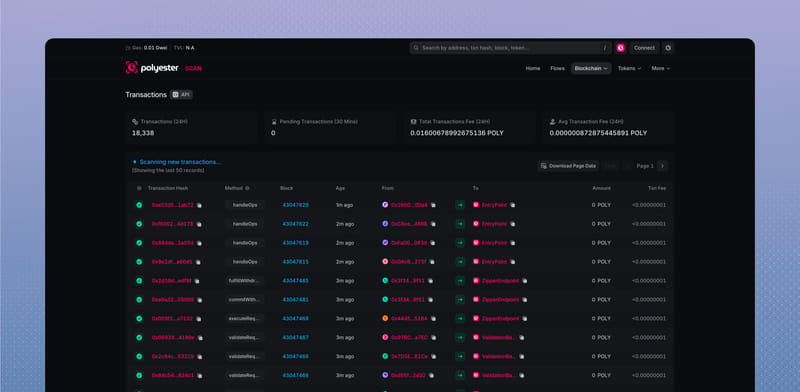
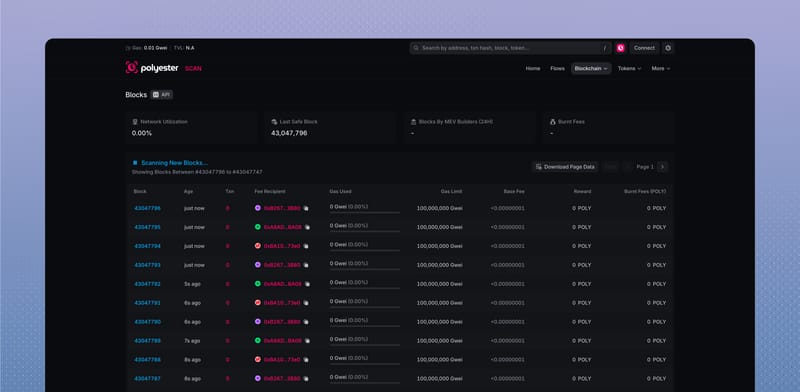
| Page | What you can see |
|---|---|
| Transactions | Confirmed transactions, methods, blocks, addresses, amounts, and fees |
| Pending Transactions | Transactions waiting to be included in a block |
| Internal Transactions | Contract calls and internal value movements created during execution |
| Blocks | Block production, included transactions, gas, fees, and producer information |
| Accounts | Public addresses and their indexed Polyester Chain activity |
The main lists update as new records arrive. When useful, Download Page Data exports the rows currently shown in the table.
Read a transaction
The Overview gives you the transaction's result and main details. A Success status means the Chain execution completed without reverting. Failed means it reverted, while Pending means it has not yet reached a final Chain result.
Use the tabs when you want more detail:
| Tab | What it shows |
|---|---|
| Token Transfers | ERC-20 transfers, mints, and burns |
| Internal Txns | Calls or value movements created inside the transaction |
| Logs | Events emitted by the contracts involved |
| State | Indexed before-and-after changes created by execution |
If the transaction belongs to a deposit, withdrawal, or transfer Flow, Scan also shows a Flow summary with links to the other lifecycle stages.
Read a block
A block groups transactions that were included together. Its Overview can show the block height, time, transaction count, producer, gas use, base fee, burned fees, and the hashes that connect it to the surrounding Chain history.
Additional tabs provide the transactions and internal calls within the block. Consensus, MEV, and blob information appears when the active Chain supplies it.
Read an address
An address page adapts to the type of address you open:
- a regular wallet address shows its public balance and activity
- a Safe smart account adds smart-account and Flow information
- a contract can add source code, contract methods, proxy information, and trusted Polyester labels.
All of these pages show public Polyester Chain activity. They do not reveal the person behind an address or the private contents of a Polyester account.
Use Asset Flows when you want the complete deposit, withdrawal, or transfer journey rather than one Chain transaction.