The Unified Trading Account is where you use Assets for spot trading and borrowing. It maintains private, low-latency Unified Asset balances for Orders, Fills, eligible collateral, and transfers.
Each Main Account and Subaccount has its own Trading Account, balances, Orders, and activity. Switching the active account changes what you see and what you can use, so check the selected account first if an expected balance or Order appears to be missing.
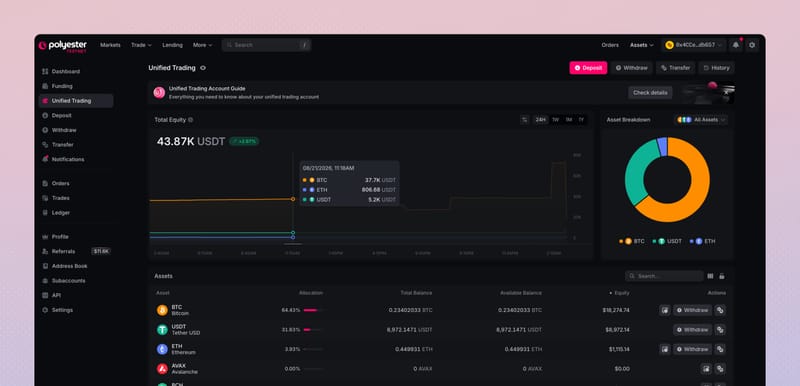
What the Trading Account does
Trading keeps the balances used by PolyEngine separate from the on-chain balances held in Funding.
- Makes Assets available for trading. Available balances can support new spot Orders on Polyester's order books.
- Keeps Trading activity private. Your balances, Orders, Fills, and strategies are visible only to your account.
- Separates available and reserved amounts. Trading shows what the account holds, what is free to use, and what is already committed.
- Supports borrowing and margin. Eligible Assets can contribute collateral value and support borrowing or other margin obligations. Holding an Asset in Trading does not lend it out or make it earn yield.
- Keeps accounts separate. Every Main Account and Subaccount has its own Trading balances and activity.
How Trading balances work
Three quantities describe each Unified Asset balance:
- Total Balance is the complete amount of the Asset held in Trading.
- Available Balance is the amount free for a new Order, borrowing action, transfer, or withdrawal.
- Reserved Balance is the amount already committed to an active Order, loan, withdrawal, transfer, or another pending action.
Polyester updates Available and Reserved Balance automatically as activity begins and ends. When an action commits an amount, that amount becomes Reserved. Any unused amount returns to Available when the action fills, is canceled, completes, or reaches another final state.
Example: Reserve BTC in an open Order
Suppose your Trading Account holds a Total Balance of 1  BTC. You place a sell Order for 0.4 BTC on the
  BTC/USDT order book.
While the Order is open, the 0.4 BTC committed to it appears as Reserved Balance. The remaining 0.6 BTC stays Available for another eligible action.
If you cancel the unfilled Order, the reserved amount returns to Available Balance. If the Order fills, Polyester settles the sold BTC and credits the USDT received from the trade.
Read your balance
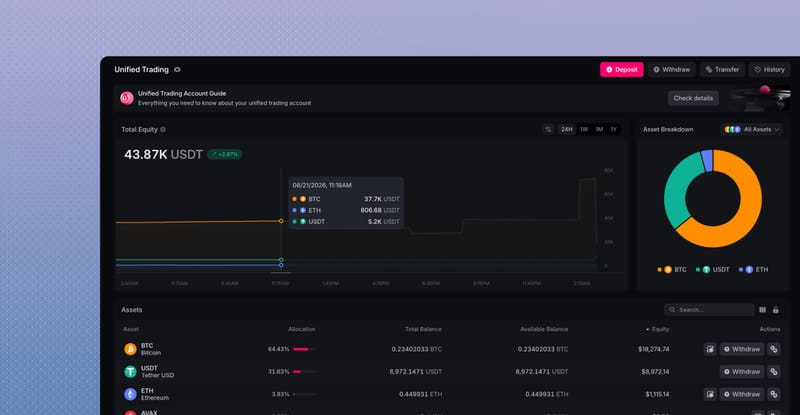
The Assets table shows the private Unified Asset balances held in the selected Trading Account. Total Balance shows the full amount held in Trading, while Available Balance shows what the account can use for a new action right now.
Open a Total Balance to see its Reserved Balance, or choose an available action when you are ready to trade or transfer the Asset.
| Field | What it tells you |
|---|---|
| Total Equity | The estimated current value of all Trading balances in the selected account, calculated from their Index Prices. |
| Balance History | How that estimated value changed during the selected period. Index Price changes can move the chart without an Order or transfer. |
| Allocation | The Asset's share of the total displayed Trading equity. |
| Total Balance | The complete amount of the Asset held in Trading. |
| Available Balance | The amount free for a new Order, borrowing action, transfer, or withdrawal. |
| Reserved Balance | The amount already committed to an active or pending action. |
| Equity | The estimated current value of the Asset's Total Balance, calculated from its Index Price. |
| Actions | The Trade or Transfer actions currently available for the Asset. |
Use Assets in Trading
An available Trading balance can support several actions:
- Place a spot Order. Buy or sell an Asset through an available Pair and its order book.
- Transfer to another Polyester account. Send an available balance to another eligible account.
- Borrow against eligible collateral. Use an eligible Trading Asset as collateral when you borrow another Asset.
- Withdraw an Asset. Send an available balance to an external address through an available destination route.
Only Available Balance can begin a new action. If part of the balance is Reserved, the existing Order or pending activity must release it before it can be used again.
Trading and Lending
Eligible Assets in Trading can contribute to account collateral and borrowing power. Polyester's risk engine can continue to recognize eligible collateral committed to open Orders, allowing the same capital to support trading and borrowing when account requirements are met.
Borrowing introduces liquidation risk. If the account no longer meets its margin requirements, eligible collateral in Trading may be sold to repay its obligations.
Transfer between Funding and Trading
Use Transfer when an available Funding balance should support trading, borrowing, or margin, or when an unused Trading balance should return to Funding.
Open Transfer
Keep Between My Accounts selected and review any values already shown in the form.
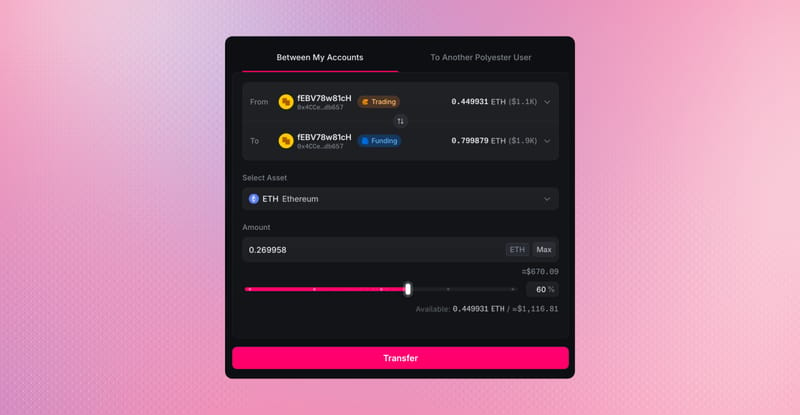
Choose the source and destination
Select Funding as the source and Unified Trading as the destination to move an Asset into Trading. Reverse them to return an available Trading balance to Funding. Use the same Main Account or Subaccount on both sides.
Choose the Asset and amount
Select an Asset held by the source account and enter an amount within its Available Balance.
Review and transfer
Confirm the account, direction, Asset, and amount, then select Transfer once. Wait for Transfer History and both balances to show the result before using the balance or trying again.
Use Withdraw when the destination is an external chain. A withdrawal from Trading reserves the amount, moves it through Funding and Zipper, and remains subject to the route's inventory, fees, minimums, policies, permissions, and security controls.
Learn the difference between funding and trading.
Funding and Trading can show the same Unified Asset, but they serve different purposes. Funding is the on-chain balance area for deposits, transfers, and withdrawals. Trading is the private, low-latency balance area used by Orders, reservations, Fills, fees, and eligible collateral for borrowing.
| Compare | Funding Account | Trading Account |
|---|---|---|
| Purpose | Deposits, withdrawals, and transfers | Trading, borrowing, and margin |
| Recorded on | Polyester Chain | PolyEngine Ledger |
| Publicly seen | Yes | No |
| Lending | Not supported | Supported for eligible Assets |
Moving an Asset into Trading does not bridge it, change its owner, create another Zipped Asset, or move the underlying Zipped Asset out of Funding. It changes which part of the same Polyester account can use the corresponding Unified Asset balance.
Funding-to-Trading transfers settle as one Polyester Chain transaction and normally appear in Trading almost immediately. Once the transfer completes, the updated Trading balance is ready to use.
FAQ
No. Each Main Account and Subaccount has its own Unified Trading Account, balances, Orders, and Fills. Check the active account before trading or transferring Assets. Learn about Trading.
No. You must first transfer the amount you want to trade from your Funding Account to your Unified Trading Account before placing orders. Learn about Trading.