Withdrawals let you send an available Polyester balance to an external wallet on a supported chain. Zipper handles the route, validation, and external delivery, so you do not need to unwrap assets or hold gas on Polyester.
Zipper handles the Withdrawal Flow automatically. You submit once, and Polyester tracks the request until the destination transaction reaches finality.
If the recipient is another Polyester account, use the Transfer page instead.
Make a withdrawal
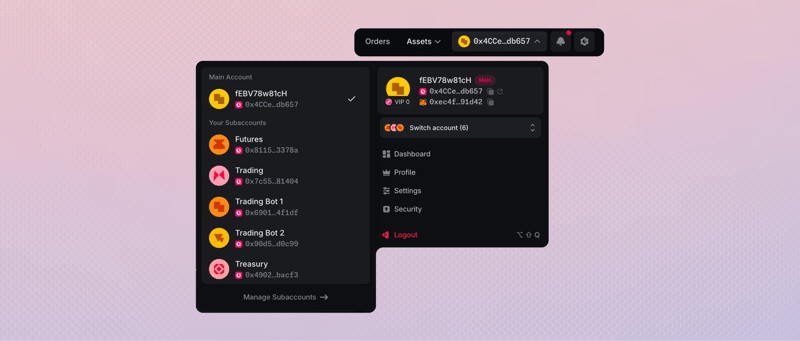
Open Withdraw from the Main Account or Subaccount that holds the balance. Switching the active account changes the balances and history you see.
Choose the sending account
Select the Main Account or Subaccount that holds the balance, then open Withdraw.
Choose the Asset and source
Select the Asset and whether it comes from Funding or Unified Trading.
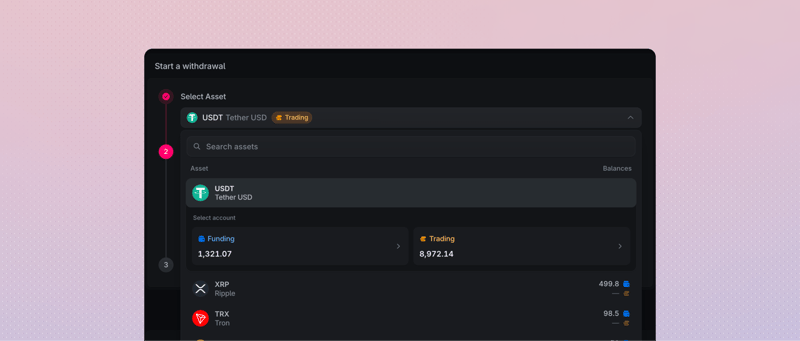 Selecting USDT as the token and Trading as the source
Enter the destination and amount
Select the destination Network, paste the complete address or choose an Address Book entry, and enter the amount. Include the Destination Tag when the route requires one.
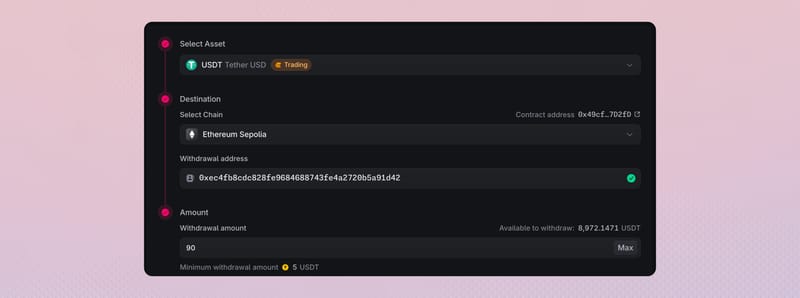 Selecting Ethereum Sepolia and entering 90 USDT
Review and confirm
Review You will receive, the route fee, Fee source, and Balance after withdrawal. Then approve the request in the connected wallet.
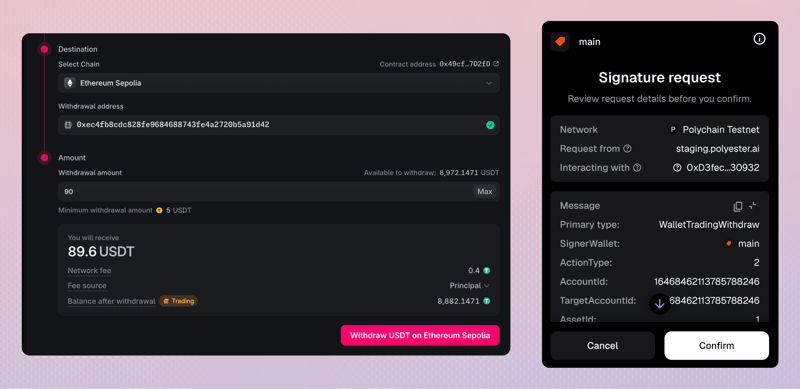 Using the wallet to confirm the 90 USDT withdrawal
Watch the in-progress withdrawal
Open the withdrawal record after you submit. Follow Requested Withdrawal while Polyester validates and submits the destination transfer.
 Watching an in-progress 90 USDT withdrawal
Confirm the completed withdrawal
When Withdrawal Settled completes, check the settled amount and the destination transaction.
USDT Withdrawn via Ethereum
Completed

Started
Steps
What happens after you submit
Submitting the request begins the Withdrawal Flow. Polyester then moves it through six stages:
Requested Withdrawal
Polyester accepts the request and locks the withdrawal amount plus the applicable fee from the selected source.
Validated Withdrawal
Independent Zipper validators review the route, amount, destination, and account policy. The flow continues only after they approve the request.
Processed Withdrawal
Zipper executes the approved request on Polyester Chain. It prepares the route-specific Zipped Asset for external delivery.
Submitted to Source Chain
Zipper submits the external transfer toward the destination Network. The withdrawal record then links that destination transaction.
Zipper Fulfillment
Zipper follows the destination transaction until the receiving wallet can observe it. The route-specific Zipped Asset remains locked while the transaction awaits finality.
Withdrawal Settled
After the destination transaction reaches finality, Zipper burns the locked route-specific Zipped Asset and Polyester completes the request. The wallet receives the settled amount after any route fee.
You can see more details on Polyester Scan.
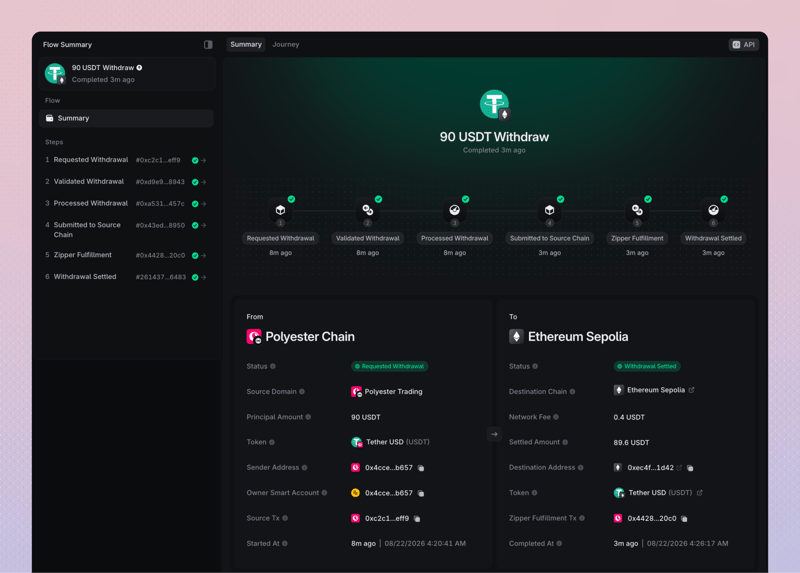 Viewing a completed 90 USDT Withdrawal Flow on Polyester Scan
You never need to unwrap the Asset yourself or hold the Zipped Asset in an external wallet. The Withdrawal Flow handles those steps between your Polyester account and the destination Network.
Track each withdrawal
Every request has its own withdrawal record. Follow that record from submission through external delivery rather than treating one completed withdrawal as confirmation that every request arrived.
Open Account/Withdraw to view the withdrawals data table.
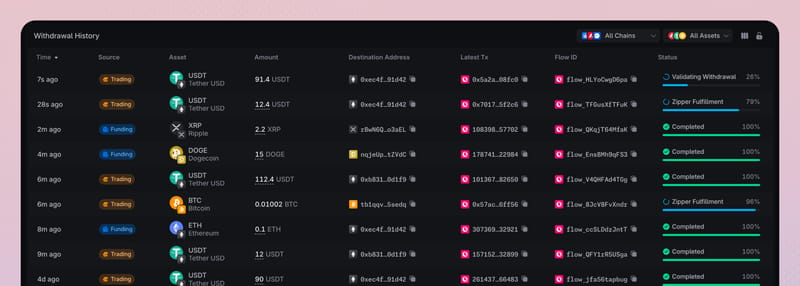 In view (Account/Withdraw) data table
Do not submit a second withdrawal while the original request is still pending or its result is unclear. Continue following the same Flow ID and destination transaction.
After completion, compare the settled amount with the withdrawal record and the destination wallet.
Withdraw from Funding or Unified Trading
Choose the balance area that currently holds the amount you want to withdraw.
- Funding Account. Withdraw any available Funding balance supported by the selected destination route.
- Unified Trading Account. Withdraw the available balance that is not reserved by Orders or another pending action.
A withdrawal from Unified Trading can use only the amount shown as available. Open orders and other pending actions can reserve part of the balance. Polyester moves an approved Trading withdrawal through Funding and Zipper automatically; you do not need to transfer it yourself first.
Fees and amounts
Each destination route has a current Polyester route fee denominated in the selected Asset. Fee source changes how that fee relates to the amount you enter; it does not select a different fee.
| Fee source | The amount you enter | What leaves your balance | What the wallet receives |
|---|---|---|---|
| Principal | Total amount to withdraw | The entered amount | The entered amount minus the fee |
| Balance | Amount the wallet should receive | The entered amount plus the fee | The entered amount |
Use You will receive and Balance after withdrawal to confirm the result before submitting. When Balance is selected, your available source balance must cover the entered amount plus the fee.
The Withdraw page also shows the route minimum and any current Max value. Your available balance, route inventory, minimum, fee, and account controls determine the amount that can be withdrawn. Polyester does not apply a separate global daily or per-transaction monetary cap.
Address Book and Withdrawal Whitelist
An Address Book entry saves an external destination for easier reuse. It does not automatically approve that address for withdrawals.
If the active account requires an External Withdrawal Whitelist, select a destination with an active whitelist record for that chain. Each Main Account and Subaccount has its own Address Book and withdrawal controls.
For XRP, enter the classic address in Withdrawal address and the receiver's numeric tag in Destination Tag. Polyester cannot determine that a recipient expected a tag when one is omitted.
FAQ
You can withdraw your Available Balance at any time, although funds reserved for open orders or pending activity cannot be withdrawn. Once you close all open orders and complete any other pending transactions, the reservations will be released and your Available Balance will equal your Total Balance in both your Funding Account and Unified Trading Account.
Yes. Select Unified Trading as the source for your withdrawal. Polyester automatically moves the funds through the Funding Account to Zipper. Only your available balance in the Unified Trading Account can be withdrawn. Funds reserved for open orders or other pending actions must be released first if you want to withdraw them.
Withdrawal times depend on the destination blockchain and its current network conditions. The receiving wallet or exchange may also require confirmations before showing the funds as available. You can track your withdrawal’s progress in the withdrawal history table on the Withdraw page.
If a withdrawal fails before external delivery, the withdrawal amount can be returned, although fees already charged may not be refunded. For withdrawals from Unified Trading, returned funds go back to the same Trading Account. If delivery is still uncertain, the funds may remain reserved until the outcome is resolved. Check the withdrawal history table on the Withdraw page for its status.