You can sign in to Polyester with a non-custodial wallet, Google, or email. The method you choose becomes the owner credential that brings you back to the same Polyester account.
Every Main Account and Subaccount has its own Safe smart account on Polyester Chain. Your owner credential authorizes that account; your Safe holds the account identity and on-chain activity.
Choose your sign-in method
Connect MetaMask, Rabby, Phantom, WalletConnect, or another supported wallet. Your wallet signs a message to prove ownership without sharing its private key or paying gas.
The wallet provider remains responsible for its backup and recovery. Returning with the same wallet address reconnects you to the same owner path.
Google creates a Turnkey-backed embedded owner wallet connected to your Google identity. Sign in with the same Google account whenever you return.
Email creates a Turnkey-backed embedded owner wallet connected to your email address. A verification code proves access to that mailbox during sign-in.
Your owner credential and smart account
Your owner credential approves account access and protected actions. It is always a non-custodial wallet, whether you connect an existing wallet or create an embedded owner wallet with Google or email.
Your Safe smart account is the Polyester account that appears on Polyester Chain. It has its own address and does not have one account-wide private key to export. The owner credential signs for it.
Signing in is free. The Safe is deployed automatically with your first eligible on-chain action, such as your first deposit, if it has not already been deployed.
Sessions and MFA
After you sign in, the browser keeps your Polyester session until it expires or you sign out. Signing out of Polyester does not sign you out of your wallet, Google account, or email provider.
Completing multi-factor authentication (MFA) elevates your session for 30 minutes. While your session is elevated, actions that accept session elevation can reuse that verification without another MFA prompt. Some high-risk actions still require a fresh MFA check while your session is elevated. Each successful MFA check restarts the 30-minute elevated-session period.
Export an embedded owner wallet
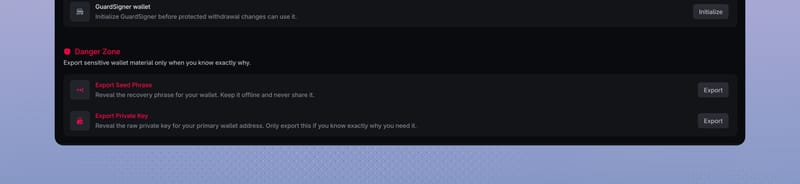
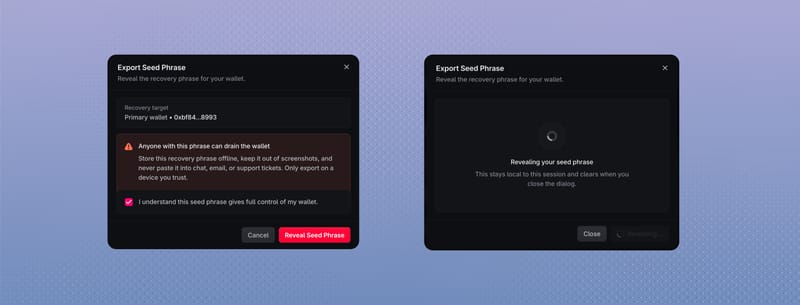
If you use Google or email, you can export the embedded owner's seed phrase or private key from the Security page. Polyester shows it only when you request an export and is never notified of the exported value.
External wallets use their own provider's export and recovery tools.
Recover access
- For a connected wallet, use the wallet provider's recovery process.
- For Google, recover the Google account connected to your embedded owner wallet.
- For email, recover access through your email provider.
- If an MFA method is unavailable, use another enrolled method or an unused recovery code.
Polyester support never needs your seed phrase, private key, email verification code, MFA code, recovery code, or API private key.
FAQ
The wallet you use to connect / sign in owns and controls your Polyester Smart Wallet, which is your Polyester account on the blockchain. Connecting / signing in establishes a session but does not move funds or make transactions by itself. You remain in control of the assets in your Funding Account and Unified Trading Account.
Every unique wallet address, Google account, or email address signs into a specific Polyester account. If you see an unexpected account, you may have used a wallet or identity other than the one linked to the account you expected. If you are certain you signed in correctly, check the account selector to make sure you’re viewing your Main Account rather than a Subaccount.