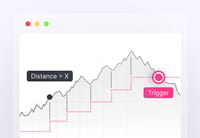
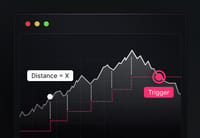
An OCO (one-cancels-other) places a take profit and a stop loss on an amount you already hold. Use it to plan for the price moving either way: whichever leg trades the amount first cancels the other, so the amount is only traded once.
Holding 0.5 BTC
$0.00
How it works
An OCO has two legs on the same Pair, side, and amount:
- Take Profit trades when the price moves your way.
- Stop Loss trades when the price moves against you.
Each leg has its own Trigger Price and executes as Market or Limit. The first leg to reach its trigger price places one order for the whole amount. Once that order has traded everything, that leg ends as Completed and the other as Canceled, with the reason OCO.
- Sell OCO: protects Base Asset you hold. The take profit sits above the price and the stop loss below it.
- Buy OCO: spends Quote Asset you hold. The take profit sits below the price, so it buys on a dip. The stop loss sits above it, so it buys if the price rises through it.
Both legs share one reserve, made when you create the OCO.
What can happen
The take profit triggers but never fills
The chart above plays out the case that surprises people most. You hold 0.5 BTC bought at $68,000. The take profit triggers at $72,000 and places a limit order at $72,500, but the price tops out near $72,120 and turns. The limit order waits, unfilled.
The stop loss is still live. When the price falls to $65,600, it cancels the unfilled take-profit order and sells at market, at $65,600.
You want the take profit to fill when it triggers
A Market take profit trades as soon as it triggers. In the chart, it sells 0.5 BTC at $72,040 right after the price reaches $72,000, and the stop loss is canceled.
Holding 0.5 BTC
$0.00
A Market leg uses the Pair's default market slippage for its side; the OCO form has no slippage setting. The limit is measured from the price that fires the leg, so when the price gaps past it, a Market leg can fill partially, or not at all.
Your stop loss is a limit order too
A Limit stop loss sets the worst price you accept. In the chart, the shaded band runs from its trigger at $65,600 down to its limit at $65,200. As before, the take-profit order never fills. The price then falls steadily into the band, so the stop loss cancels that order and sells at $65,600.
Holding 0.5 BTC
$0.00
If the price falls past the limit before the order fills, the order waits unfilled and the take profit keeps protecting the amount. See Conditional for how a limit stop behaves in a fast move.
Only part of the amount trades
A Limit order can rest on the book, or a Market order can fill partially. Either way, the OCO is not over: the other leg keeps protecting the rest. If its own trigger price is reached later, it cancels the working order and places its own order for what is left.
Fills are never reversed: whatever has traded stays in your balance.
Buying with an OCO
A Buy OCO is the mirror image. In the chart, you sold 0.5 BTC at $68,000 and want to buy it back. The take profit triggers at $64,000 on the dip, but its limit at $63,500 is never reached. When the price rises to the stop loss at $70,400, the stop loss cancels the unfilled order and buys back at $70,400.
Waiting to buy back 0.5 BTC
$0.00
OCO or attached TP/SL?
Attaching TP/SL to an order also pairs a take profit with a stop loss, but those legs protect what a new order fills, and arm as it fills. An OCO has no entry order: it protects a balance that is already in your Trading account, from the moment you create it.
Set it up
Open the OCO tab
Enter the amount
Set the take profit and stop loss
Review and submit
The confirmation lists each leg with its Entry Distance, the trigger's distance from the current market price, and its Execution, @ Market or @ Limit. A Market leg shows its Max Slippage, with (market default). The review ends with OCO (One-Cancels-Other) Enabled.
Trigger prices
Each trigger must sit on its own side of the price its leg watches:
- Sell OCO: the take profit above the price, and the stop loss below it.
- Buy OCO: the take profit below the price, and the stop loss above it.
The take profit must also be above the stop loss for a Sell, and below it for a Buy. The Order Form flags a trigger on the wrong side before you submit. If the price reaches a trigger while the OCO is being created, both legs end as Failed and nothing is placed.
When you type a % change, the app turns it into a fixed trigger price right away. It applies the percent to the price the leg watches at that moment, the last traded price for Last or the index price for Index, and rounds to the Pair's tick size. The line under the field shows the result, such as Triggers at a price.
The trigger does not move with the market afterwards; the field then shows its current distance from the price.
Funds reserved
An OCO reserves funds once, when you create it, and both legs share that reserve:
- Sell OCO: the amount, in the Base Asset.
- Buy OCO: enough Quote Asset for the leg that costs more. A Limit leg costs its limit price times the amount. A Market leg costs its trigger price raised by its Max Slippage, times the amount. The fee is added on top.
For a Buy, the leg that costs more is usually the stop loss, because it sits above the market. The % slider sizes a Buy at that cost, fee included, so 100% is the largest amount your balance can reserve.
You choose Buy for 0.01 BTC while Bitcoin trades at 100,000 USDT. The Take Profit triggers at 95,000 USDT and the Stop Loss at 105,000 USDT, both Market, with a Max Slippage of 5.00%.
- The take profit can cost up to 95,000 × 1.05 = 99,750 USDT per BTC.
- The stop loss can cost up to 105,000 × 1.05 = 110,250 USDT per BTC.
The OCO reserves for the stop loss: 0.01 × 110,250 = 1,102.50 USDT, plus the fee.
Track or cancel it
Both legs appear on the Conditional tab of Order Triggers, each marked OCO, and their fills appear in Order History.
Canceling either leg opens Cancel OCO?, and Cancel Both ends both legs and releases the reserve. If a leg's order is working, it is canceled too.
- Canceling all orders, or the dead man's switch, does not cancel an OCO that has not fired.
- If a leg has fired and its order is still working, canceling that order ends the whole OCO, both legs included.
- To change the amount or the side, cancel the OCO and create a new one.
Limits
- Self-trade prevention: Expire Maker, Expire Taker, or Expire Both. Decrement is not available on an OCO.
- Price Source: Last or Index for each leg. On a Pair with no index price, an OCO with an Index leg fails.
- Pair minimums: the amount must be a multiple of the Pair's step size, and each leg's order must meet the Pair's minimum quantity and minimum order value at the full amount. An OCO that fails these checks is rejected and nothing is reserved.
- Trigger limits: an OCO counts as two triggers toward the limit of 100 triggers per Pair, so at most 50 OCOs fit on one Pair.
Example
Bitcoin trades at 100,000 USDT and you hold 0.01 BTC. You choose Sell, then set a Take Profit at 105,000 USDT with Limit execution at 105,000, and a Stop Loss at 95,000 USDT with Market execution.
- Polyester reserves your 0.01 BTC for both legs.
- The price falls, and a trade at 95,000 USDT fires the stop loss.
- Its market order sells 0.01 BTC within its slippage limit.
Result: the stop loss ends as Completed, and the take profit ends as Canceled with the reason OCO.
These are example prices. Real fills depend on the order book when the leg fires.