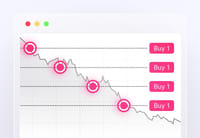
A conditional order is an order that waits. You choose a price, the Trigger Price, and nothing happens until the market reaches it. Then Polyester places your order: a market order that trades right away, or a limit order at a price you set.
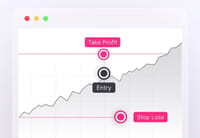
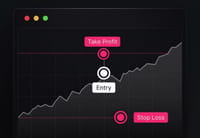
It's most often used to close a position for you: to lock in a gain once the price rises to your target (a take profit), or to limit a loss if the price falls to a level you choose (a stop loss). Where you put the trigger decides which one you get; see Take profit or stop loss.
The chart below plays one out. Drag the Trigger Price, switch between Buy and Sell or Market and Limit, and change Max Slippage to see how each choice changes the result.
Holding 0.5 BTC
−$5.92
How it works
You set the order
Polyester holds your balance
The trigger waits
The price reaches your trigger
Your order is placed
A conditional order has no expiry. It waits until the price reaches the trigger or you cancel it.
Take profit or stop loss
You don't choose "take profit" or "stop loss". You choose a side and a trigger, and where the trigger sits compared to the current price decides what the order does:
A few rules follow from this:
- The trigger can't equal the current price. The form can't tell which way you mean, and says Set a trigger above or below the current price.
- The direction is fixed when you submit. The form compares your trigger with the price at that moment. If you later edit the trigger, it has to stay on the same side: the form says Keep the trigger above the current price. or Keep the trigger below the current price.
- Check the trigger against the live price before you submit. If the price crosses your trigger while you're filling in the form, the order flips: a sell meant as a stop loss becomes a take profit that waits for the price to rise back.
Market or limit?
When the trigger fires, the order executes one of two ways. This is the most important choice you make.
Most stop losses use Market, because a stop is about getting out. Take profits often use Limit, because you have a target price in mind and can afford to wait for it.
Market execution
When the trigger fires, Polyester sends a market order. It fills against the best prices on the order book at that moment, the way an ordinary market order does.
The fire price. The trigger fires on the first trade at or past your trigger price. In a calm market that trade is right at your trigger. In a fast move it can be well past it: if the price drops from 66,100 straight to 65,900, a trigger at 66,000 fires at 65,900. That first trade is the fire price, and your order fills from there, not from your trigger.
Max Slippage is your protection. It's the furthest from the fire price your order is allowed to fill:
- A sell never fills below the fire price minus Max Slippage.
- A buy never fills above the fire price plus Max Slippage.
- Whatever can't fill within that range is canceled. You keep the part that didn't sell, or the funds that weren't spent.
So Max Slippage is a trade-off. A tight limit protects your price but can leave part of the order unfilled in a fast market. A wide limit makes sure the whole order fills but accepts a worse price.
The chart below is a stop loss at 66,000 that the price falls straight through. Change Max Slippage to see how much of the 0.5 BTC sells: at 0.5% only part of it fills and the rest is canceled, while at 2% all of it fills, at a lower price.
Holding 0.5 BTC
−$5.92
Setting Max Slippage. With Market selected, Max Slippage appears in the order details above the submit button. Select it to change it:
- Enter a percentage of the price (from 0.01% to 99.99%), or switch to an amount in the Quote Asset, such as 500 USDT.
- It starts at the Pair's default, and once you set it, the Order Form remembers your choice for that Pair.
- Your order confirmation, if it's on, shows it before you submit.
Market execution isn't available on a Pair that only accepts post-only orders, because a market order always takes liquidity. The form keeps Limit selected there.
Limit execution
When the trigger fires, Polyester places a limit order at your Execution Price. From then on it behaves like any limit order: it fills at your price or better, can fill in parts, and waits on the book for the rest.
When you switch to Limit, the execution price starts at your trigger price. Where you move it from there matters:
- Sell, execution price at or below the trigger: when the trigger fires, the order can sell right away to bids at or above your price. Your execution price is a floor: you'll never sell below it. This is the usual setup for a stop loss limit.
- Sell, execution price above the trigger: the order waits on the book for the price to keep rising. If the price turns back first, nothing sells. This suits a take profit when you'd rather wait for a better price.
- Buy is the mirror image: an execution price at or above the trigger can buy right away, and one below it waits for the price to fall further.
The shaded band on the chart is where your limit order can fill. Here the trigger fires, but the price turns back before it reaches the execution price, so the order never fills.
Holding 0.5 BTC
−$5.92
Time In Force, under Advanced, decides what happens to any part that can't fill right away once the order is placed:
- Good Til Canceled, the default, keeps it on the book until it fills or you cancel it.
- Immediate Or Cancel fills what it can at once and cancels the rest.
- Fill Or Kill fills the whole amount at once, or cancels the order.
Good Til Date isn't offered for conditional orders. See Time-in-Force & Post-Only for more.
Which price the trigger watches
The Trigger Price field has a Last / Index toggle that sets the price your trigger compares against:
- Last, the default, is the most recent trade on the Pair. It reacts fastest, but a single large trade can move it for a moment and fire your trigger on a brief spike.
- Index is the market's index price. It moves more smoothly, so a brief spike in the last price may not fire your trigger. If the index price goes stale, the trigger waits until it updates.
Holding 0.5 BTC
+$1.48
Whichever price fires the trigger, a market order still fills against this Pair's order book. See which price a trigger watches for the details.
Set it up
Open the Conditional form
Enter the trigger price
Choose the execution
Enter the amount
Check the details
Submit
Two shortcuts fill in the form for you:
- From the chart. On the Polyester Chart, select the + at a price, then Sell stop (below the last price) or Buy stop (above it). You can drag the preview line before you submit.
- From the Order Book. Selecting a price in the Order Book fills in the trigger price for Market, or the execution price for Limit.
To add a take profit or stop loss to the order that opens a position, attach a TP/SL instead. To protect the same amount with both a take profit and a stop loss, use an OCO.
What your balance holds
The balance is reserved when you create the order, not when it fires:
- Sell: the Base Asset amount you're selling.
- Buy with Market: enough Quote Asset to cover the amount at your trigger price raised by your Max Slippage, plus the fee. This is why the maximum buy amount shrinks when you raise Max Slippage.
- Buy with Limit: the amount at your execution price, plus the fee.
Reserved balance can't be used by another order. That's why two conditional orders can't both sell the same coins: the second is refused for lack of balance. Use an OCO for a take profit and stop loss on the same amount.
Track, edit, and cancel
- Before it fires, the order is on the Conditional tab of Open Orders. Its Type reads Conditional Market or Conditional Limit.
- You can edit the Trigger Price while it waits, from the table or by dragging its line on the chart. It has to stay on the same side of the current price. To change anything else, cancel it and create a new one.
- After it fires, a market order's fills appear in Order History. A limit order shows on the Limit tab of Open Orders while it waits on the book.
- Canceling the conditional order before it fires releases the reserved balance. Once it has fired, canceling it doesn't cancel the limit order it placed; cancel that order separately.
When it doesn't fill as expected
- The price never reaches the trigger. The order keeps waiting, and your balance stays reserved.
- Market, partially filled or not at all. The book didn't hold enough within Max Slippage of the fire price. The rest was canceled and its balance returned.
- Limit, not filled. The price moved past your execution price before the order could fill. It stays on the book until the price comes back, or until you cancel it.
- Rejected when it fires. Your balance, an account policy, or the market's state can reject the order the trigger places.
Examples
A stop loss in a fast drop
Bitcoin trades at 100,000 USDT and you hold 0.5 BTC. You place a sell Conditional order with a trigger price of 95,000 USDT and Market execution. The trigger is below the price, so it's a stop loss.
The price falls quickly, and the first trade past your trigger is at 94,000 USDT. That's the fire price.
- With Max Slippage 0.5%, the lowest price your order accepts is 93,530 USDT. Only 0.2 BTC of bids sit between 94,000 and 93,530, so 0.2 BTC sells for about 18,760 USDT and the other 0.3 BTC is canceled. You still hold 0.3 BTC.
- With Max Slippage 2%, the lowest price is 92,120 USDT. All 0.5 BTC sells, averaging 93,300 USDT, for 46,650 USDT.
Neither result is 95,000 USDT. The trigger decides when the order fires, not the price you get.
A take profit at a target
You hold 0.5 BTC bought at 100,000 USDT. You place a sell Conditional order with a trigger price of 110,000 USDT, Limit execution, and an execution price of 109,800 USDT.
- A trade at 110,000 USDT fires the trigger.
- Polyester places a limit sell for 0.5 BTC at 109,800 USDT.
- Bids at 109,900 USDT buy all 0.5 BTC.
Result: you sell 0.5 BTC for 54,950 USDT before fees. If the price had dropped below 109,800 USDT before the order filled, it would have waited on the book instead.
These are example prices. Real fills depend on the order book when the trigger fires.
FAQ
Both. The same order becomes a stop loss or a take profit depending on your side and where you put the trigger compared to the current price. See Take profit or stop loss.
With Market, the order fills from the fire price, the first trade at or past your trigger. In a fast move that trade can be well past your trigger, and the order fills from there, within your Max Slippage.
With Market, the order book didn't hold enough within Max Slippage of the fire price, so the rest was canceled. With Limit, the price moved past your execution price after part of the order filled; the rest waits on the book.
Not with two conditional orders: each reserves its own balance, so the second is refused. Use an OCO, which places both and cancels one when the other trades.
A conditional order's trigger stays where you put it. A trailing stop moves its trigger along as the price moves in your favor.