Preferences change how Polyester looks and displays information in this browser. They do not change your balances, orders, or account security.
Open Settings
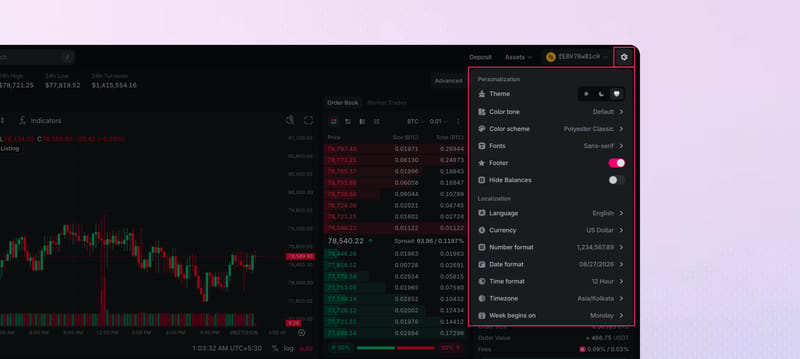
Select the gear in the top nav to open Settings, with sections for Preferences, Appearance, Notifications, and Security. The same pages live under Settings.
For a quick change, hover over the gear to open the quick menu, or tap the gear on mobile. Update a control under Appearance or Localization, or use the Footer and Hide Balances switches. The change applies as you choose it.
Where choices are saved
Your choices save on this browser only. They are not stored on your Polyester account. Another browser, another device, or cleared browser data starts from the defaults.
Available settings
- Appearance: mode, theme, trading palette, and font
- Language & Region: dates, times, currency, and numbers, with language selection coming soon
- Sounds: master volume and category levels (coming soon)
- Notifications: which order and funding updates appear on screen
- Balances: hide account amounts on screen
- Footer: the market ticker at the bottom of the trading screen