Your Dashboard gives you a high-level view of everything happening in your account. It shows your current account equity, Funding Account and Unified Trading Account balances, asset allocation, open orders, and recent transactions.
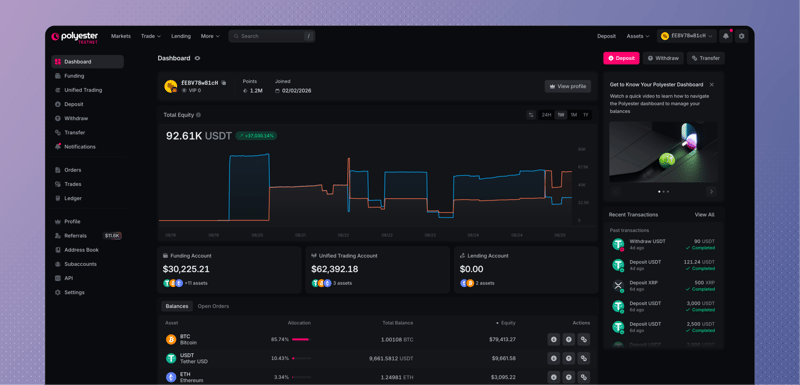
Dashboard at a glance
Total equity
Total Equity estimates the current value of the assets in your Funding Account and Unified Trading Account. It can change when asset prices move, even when you have not deposited, withdrawn, or traded.
Funding Account and Unified Trading Account
The Dashboard shows how much value is held in each part of your account:
- Funding Account holds assets available for deposits, withdrawals, and internal transfers.
- Unified Trading Account holds assets available for trading, with borrowing and margin coming soon.
Open Funding Account or Unified Trading Account when you need the complete balance details.
Assets
The Assets view combines your Funding Account and Unified Trading Account balances by asset. It shows the quantity you hold, its estimated value, and its share of your account equity.
The combined balance is not always the amount available for a new action. Open orders, withdrawals, and transfers can reserve part of a Unified Trading Account balance.
Open orders
Open Orders shows orders that are still working or partially filled. Open Orders or Manage Orders to change or cancel an order and see its complete fill history.
Recent transactions
Recent Transactions shows your latest deposits, withdrawals, and transfers with their current status. Select a transaction when you want to see its complete progress and identifying details. Open Ledger for the complete balance history.
Quick actions
Use Deposit, Withdraw, or Transfer to start moving an asset. These actions open the relevant page with your account context ready, but nothing moves until you review and submit the request.
Find anything with global search
Select Search in the top nav, or press / or Ctrl+K (Cmd+K on Mac), to search from any page. Tabs narrow the results to pairs, accounts, actions, pages, announcements, or documentation.
Use the Accounts tab to find your Main Account or a Subaccount you can access. Choose Switch to make it your active account, or View to open a Subaccount's page.
FAQ
Part of your balance is reserved for activity already in progress. Unfilled portions of orders, pending withdrawals, and pending transfers can reduce Available Balance while leaving Total Balance unchanged. Trading uses only the Available Balance in your Unified Trading Account. Learn about Trading.
Your account’s displayed value uses each asset’s Index Price, a reference price based on prices and trading volumes across multiple exchanges. When those prices change, your account value can rise or fall even if your token quantities stay the same.