Introducing Polyester Scan
We built an explorer that makes it easy to follow your money from start to finish, explore vaults, and understand onchain activity.

We're excited to introduce Polyester Scan, the explorer we've built around how you use Polyester.
Polyester Scan is the explorer for Polyester Chain and Polyester Exchange. It gives you a connected view of deposits, withdrawals, transfers, and onchain exchange activity, without compromising the privacy of your trading balances, orders, and fills.
We wanted to build something that reflects how you actually use Polyester. When you send BTC to your account, you're thinking about whether it has arrived, what's happening to it, and when you'll be able to use it. When you withdraw to another network, you want to follow that movement all the way to its destination.
Those are the questions we built the Polyester Scan experience around. We've developed its interface and Polyester-specific journeys from the ground up, connecting the details of individual transactions to the bigger picture of where your Assets are going.
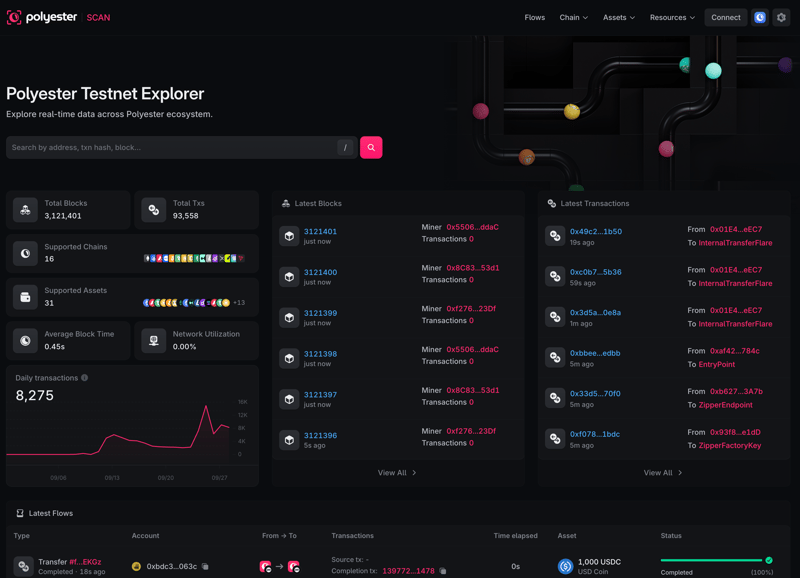 Polyester Scan home. Screenshots in this announcement were captured from the live testnet explorer.
Bringing external networks into one view
Polyester connects networks with very different designs. Bitcoin, XRP Ledger (Ripple), Bitcoin Cash, Litecoin, and Dogecoin sit alongside networks such as Ethereum and Solana in the wider Polyester ecosystem. We wanted that diversity to feel understandable when you're following your funds.
With Polyester Scan, you can see deposits coming into Polyester from supported external networks and withdrawals going back out, together in one place. A Bitcoin deposit and a withdrawal to XRP Ledger have different underlying steps, but you can follow both through the same familiar experience.
Each movement keeps its network identity, addresses, and transaction links. You can stay in Polyester Scan to understand the journey, then open the original network's explorer whenever you want to inspect a source or destination transaction yourself.
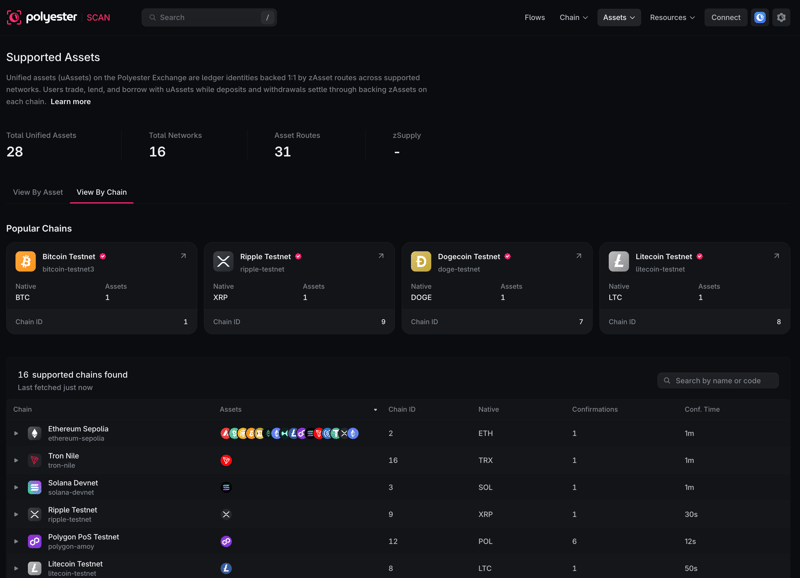 Browse supported external networks in one place. Testnet catalog.
The idea behind Flows
We call the feature at the heart of that experience Flows. If you saw our recent post, you'll know where the idea came from: our own frustration with sending funds to centralized exchanges and seeing little more than "Deposit Pending."
When you've just sent BTC, that isn't much reassurance. Has the transaction been detected? How many confirmations are left? Is it still waiting on Bitcoin, or has it reached the exchange? How much longer should you expect to wait?
We wanted to give you those answers. So we built a visual timeline that follows the movement, step by step.
A Flow is the complete journey of a deposit, withdrawal, or transfer. It connects the individual records involved, from a transaction on an external network through the applicable confirmations, approval, and settlement stages. You can see what has happened, what is happening now, and what needs to happen next.
For supported deposits, that visibility starts when the source transaction is detected, including while it is still in the mempool where the network exposes that stage. As it progresses, the timeline shows confirmation progress and the number still required, with an estimated arrival countdown when timing data is available. The estimate updates as the movement progresses; actual timing still depends on the network.
We brought the same approach to withdrawals and transfers. The Summary gives you the Asset, amount, fee, source, and destination. The Journey connects those details to the stages and underlying records. You can also browse public Flows across the ecosystem and filter by type, account, network, transaction, Asset, or status.
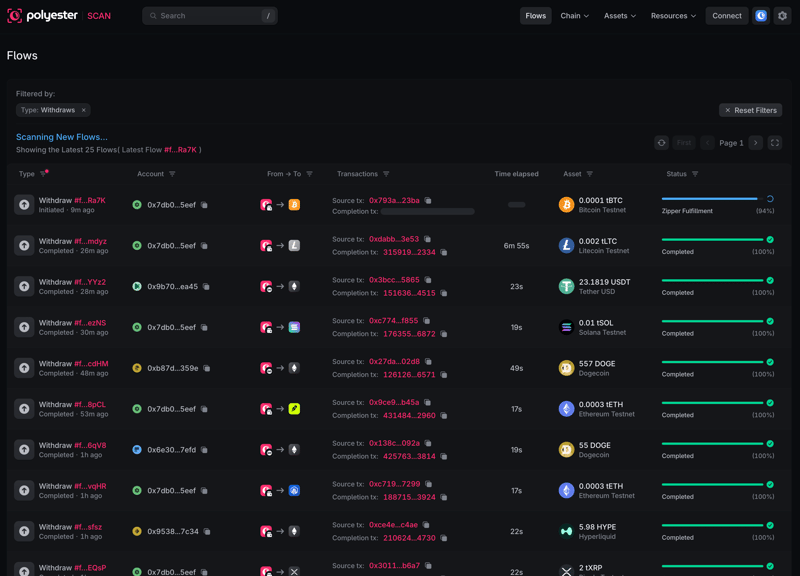 Filter public Flows by movement type and follow their status across networks. Testnet example.
A deposit, from its source to its credit
Imagine you've just sent BTC to your Polyester deposit address. We want you to be able to open that deposit and immediately understand where it stands.
As the source transaction is detected and confirmed, its Deposit Flow shows the current stage, confirmation progress, and an arrival estimate where available. You can then follow the applicable approval, Zipped Asset mint, and account-credit stages. Each completed step adds context to the one that follows.
You can find the journey by searching for the transaction hash or Flow ID, or by opening it from the Flows directory. From there, the source transaction is a click away, alongside the linked Polyester Chain records.
That distinction matters: a transaction can succeed on its source network while the deposit is still working through its remaining stages. We built Flows to make that waiting period visible and understandable.
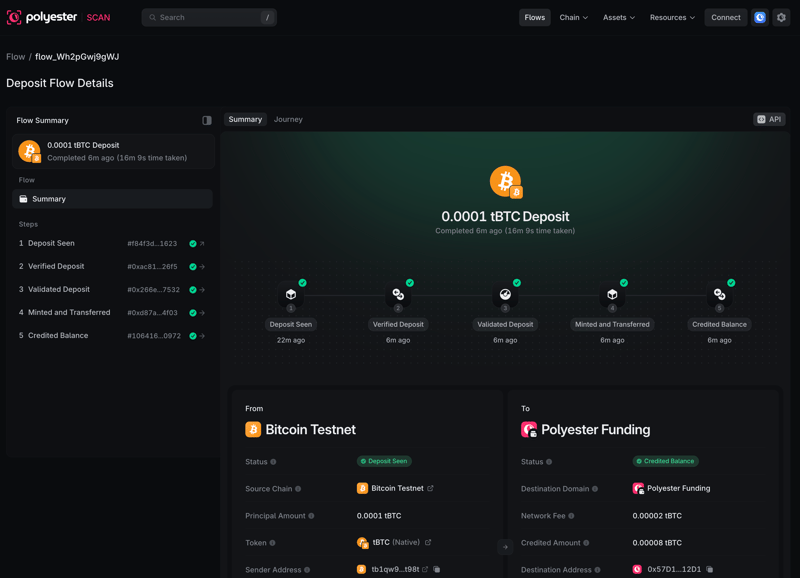 A completed Bitcoin Testnet deposit, with its connected stages in one view.
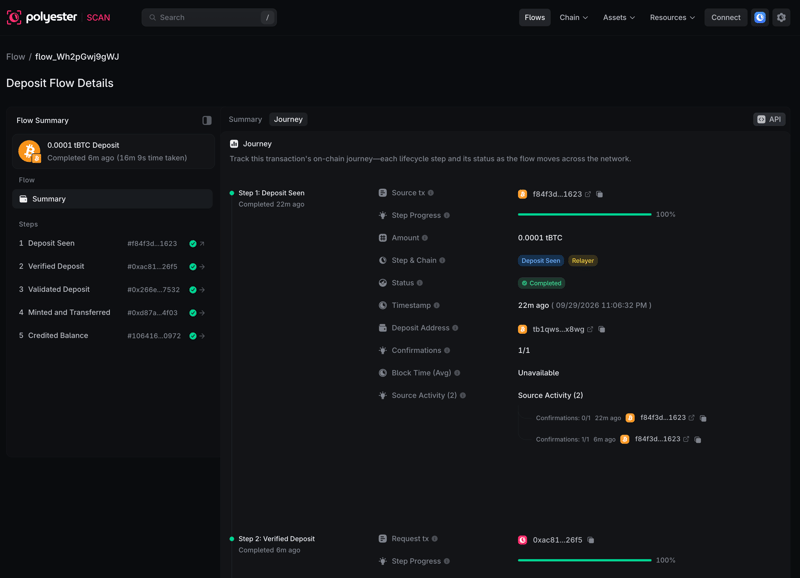 The Journey view opens up the details behind each stage. Completed testnet example.
A withdrawal, through to destination delivery
We wanted the same clarity when you're sending funds out. A Withdrawal Flow follows your Asset from Polyester to its destination on an external network, with the amount, fee, receiving address, and applicable account, burn, approval, and delivery stages connected in one view.
Open the destination transaction when it becomes available to inspect delivery on the receiving network. If a supported route ends in a failure or refund, the written Flow status tells you the outcome. A progress bar at 100% means processing has reached a terminal state; the status tells you whether it completed successfully.
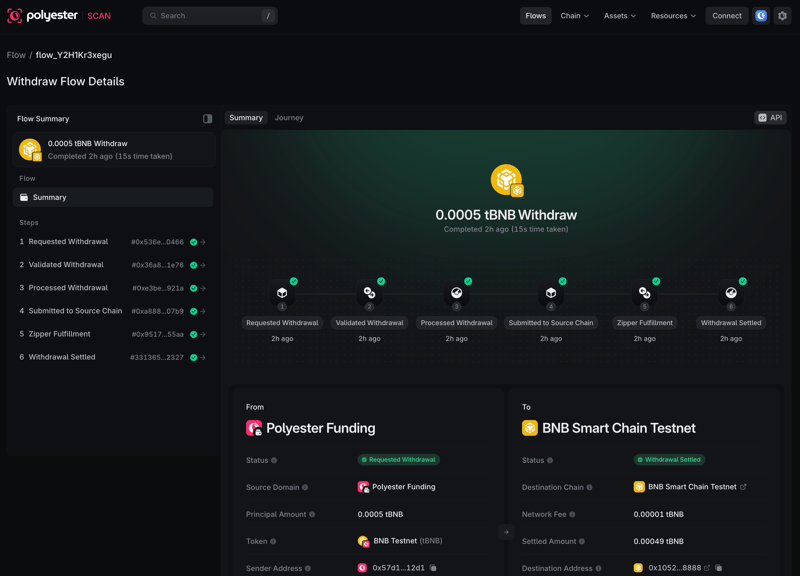 Follow a withdrawal from its request through settlement. BNB Smart Chain Testnet example.
Transfers between Polyester destinations
We also brought Flows to supported movements between Polyester accounts and account areas. These journeys can be shorter, but the question is the same: where did the Asset go, and has the movement settled? Transfer Flows show the observed movement and its settlement together.
The same Summary and Journey structure makes these movements familiar to read. Blockchain transactions link to public chain records. Ledger settlement references are identified separately, so you can tell what happened onchain and what represents an account balance step.
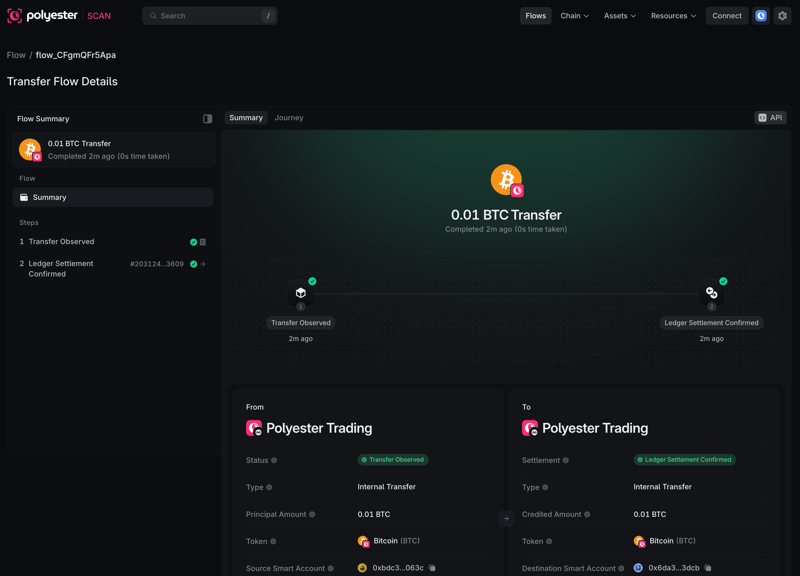 A transfer between Polyester account destinations, with its settlement linked. Testnet example.
See the networks behind one Asset
Another part of the experience we wanted to rethink was how an explorer presents Assets. Inside Polyester, compatible Assets from different networks can contribute to one unified balance. We wanted you to be able to explore that balance's Asset identity and understand the individual routes behind it.
A Zipped Asset represents an Asset from a particular source network. A Unified Asset groups compatible Zipped Assets into the identity used for a unified account balance. Where Ethereum and Solana routes map to the same Unified Asset, you can inspect each route separately while understanding how they relate to that shared balance.
We built the Supported Assets views so you can explore that relationship in either direction:
- View By Asset: browse Unified Assets, expand their routes, and inspect supported networks, identifiers, decimals, and combined Zipped Asset supply. Open an Asset to explore its related Flows, Zipped Assets, and available holder information.
- View By Chain: browse Supported Chains, compare configured Asset routes and confirmation requirements, then open a network to see its native Asset, identifiers, address format, related Flows, and external explorer.
Confirmation-time estimates reflect configured confirmation requirements and typical block time. The actual time depends on the source network.
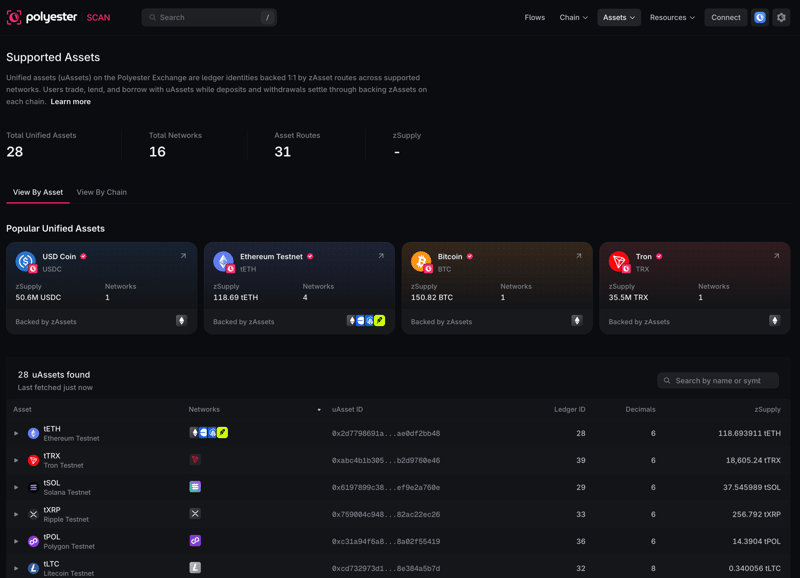 Explore Unified Assets and the networks behind them. Testnet catalog.
Follow a route down to its contract
We've kept the underlying Asset details close at hand, too. The token directory and detail pages let you inspect ERC-20 Assets alongside configured Zipped Asset routes. Where data is available, these views show price, supply, TVL, holders, transfers, and contract information.
A Zipped Asset page links its source network and source Asset to its Polyester Chain contract and its Unified Asset. You can move from the shared Asset view to a specific route, then into the Flows and transactions associated with it.
That context matters when two Assets share a symbol. The source network and contract identify the route you are actually looking at. A catalog verification badge identifies a configured Asset; source-code verification and a security audit are separate things.
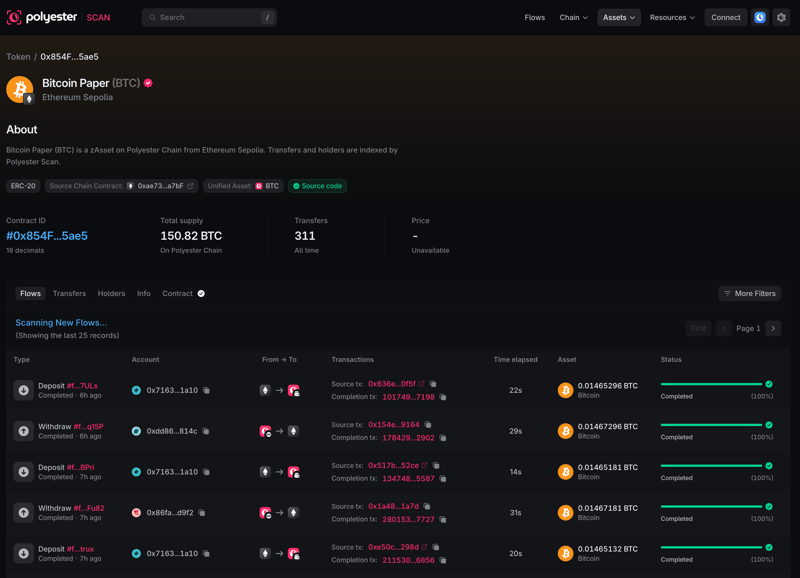 A Zipped Asset connects one source route to its Unified Asset and contract. Ethereum Sepolia example.
Search across the explorer
We wanted you to be able to start with whatever information you already have. A transaction hash. An address. An Asset name. A Flow ID. Global search connects blocks, transactions, addresses, contracts, Assets, networks, and Flows through one entry point.
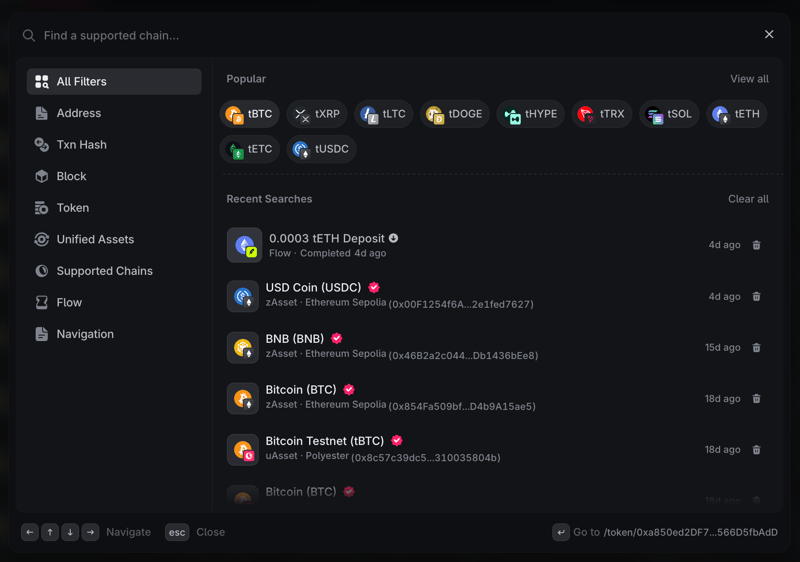 Open search to jump to an address, transaction, Asset, network, or Flow. Testnet example.
A broader query can surface multiple types of result together. That helps you distinguish a Unified Asset from an individual route, or find a network before narrowing down to its activity. Navigation search also gives you a quick route to the explorer's main pages.
Inspect public activity in detail
Alongside Flows, we've built out the explorer tools you need to dig into public activity on Polyester Chain. You can check a single transaction, explore an account's onchain holdings, or work through a block and the contract activity inside it.
| Surface | What you can investigate |
|---|---|
| Transactions | Status, method, block, participants, amount, and fee, with separate views for pending transactions and internal contract activity. |
| Transaction detail | Execution results, token transfers, mints and burns, internal calls, event logs, indexed state changes, and related Flow context where available. |
| Blocks | Included transactions, time, producer, gas use, base fee, burned fees, and links through chain history. Additional consensus, MEV, or blob data appears when the network supplies it. |
| Accounts and addresses | Public balances, Asset holdings and portfolio views, transactions, internal calls, token transfers, and related Flows. Recognized smart accounts and contracts add their relevant details. |
| Token transfers | Indexed ERC-20 movements with sender, recipient, amount, Asset, and links to the transaction that produced them. |
Start from a recent block, open one of its transactions, inspect its events, and follow an address or Asset into its wider history. These connections let you move between the network overview and the details of one action without losing the trail.
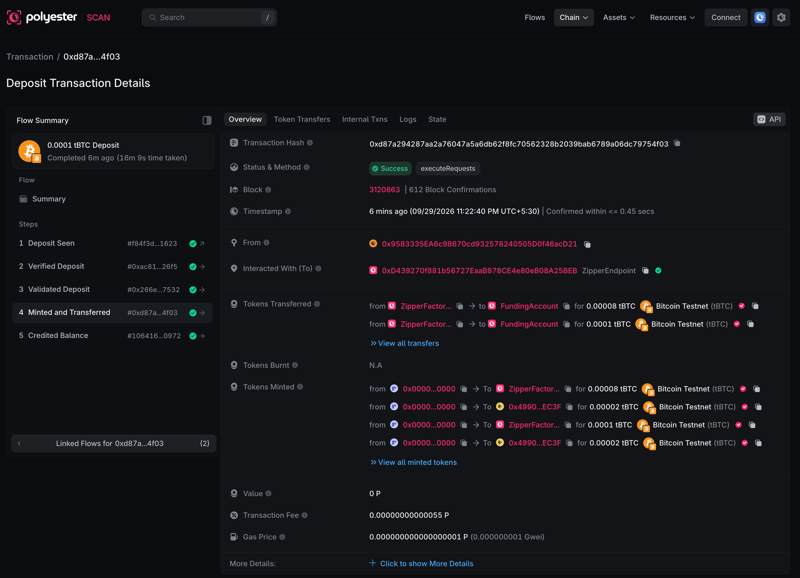 Inspect an onchain transaction while keeping the surrounding Flow in view. Testnet example.
Explore contracts, with source and an assistant in context
For developers and anyone who wants to understand the contracts behind an action, we wanted the code to be part of the same experience. The Verified Contracts directory helps you find contracts by name or address and narrow results by compiler. Contract pages bring the available source files, compiler settings, ABI, bytecode, and constructor arguments together.
Use Read Contract to query public data. Write Contract exposes supported methods through a connected account and requires transaction approval. Recognized proxies also expose Read Proxy and Write Proxy, keeping the proxy's address and history connected to the methods of its implementation.
We've also added the Polyester Scan Code Assistant directly to the source viewer. Ask what a contract does, how it handles Assets, which functions change state or move funds, or which roles have privileged permissions. You can select code and ask about that specific section while keeping the source in view.
This makes it easier to move from a question to the relevant code. Source verification establishes a match to deployed bytecode; an assistant's explanation helps with inspection and does not constitute a security audit.
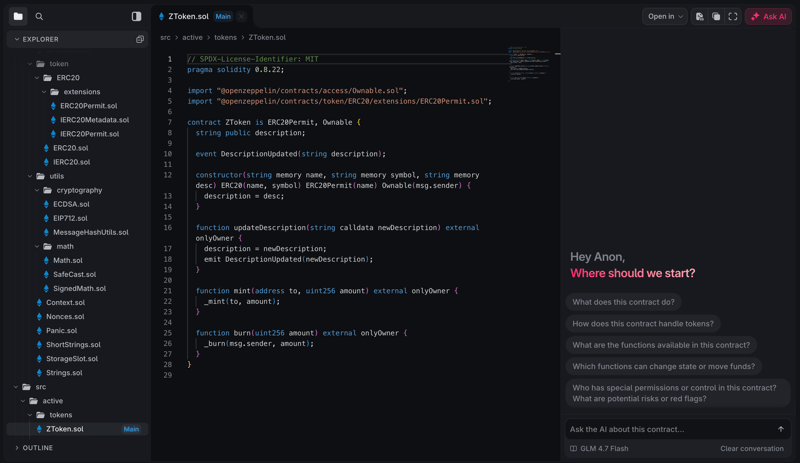 Read verified source and explore questions with the Code Assistant alongside it. Testnet contract.
Investigate patterns, fees, and activity
Sometimes you're checking one movement. Other times, you're investigating a pattern across many of them. We've included a Filters page to narrow indexed activity by transaction type, method, date, sender, recipient, amount, and Asset. Choose the columns useful to your investigation and follow matching rows into their detail pages.
On supported populated tables, Download Page Data exports the current page with its active filters. You can use it to keep a working record of the transactions or Flows you are reviewing. Supported pages also offer an API view with the read endpoint and JSON response for the current environment.
For a broader view, Stats brings together charts covering accounts, transactions, blocks, Assets, contracts, gas, and supported user-operation metrics. Gas Stats shows network utilization, fast, normal, and slow fee estimates, and gas-price history. These estimates describe Polyester Chain gas, separately from trading fees or external-network deposit and withdrawal costs.
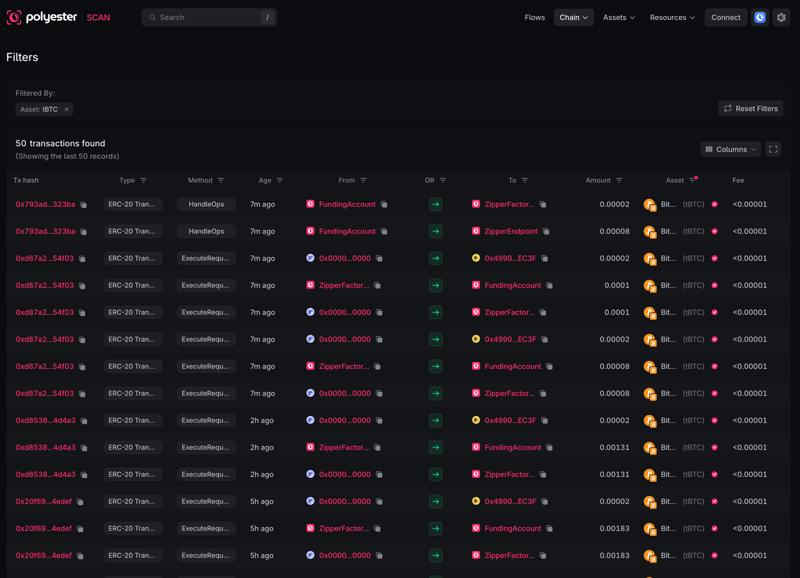 Narrow public activity with transaction filters and configurable columns. Testnet example.
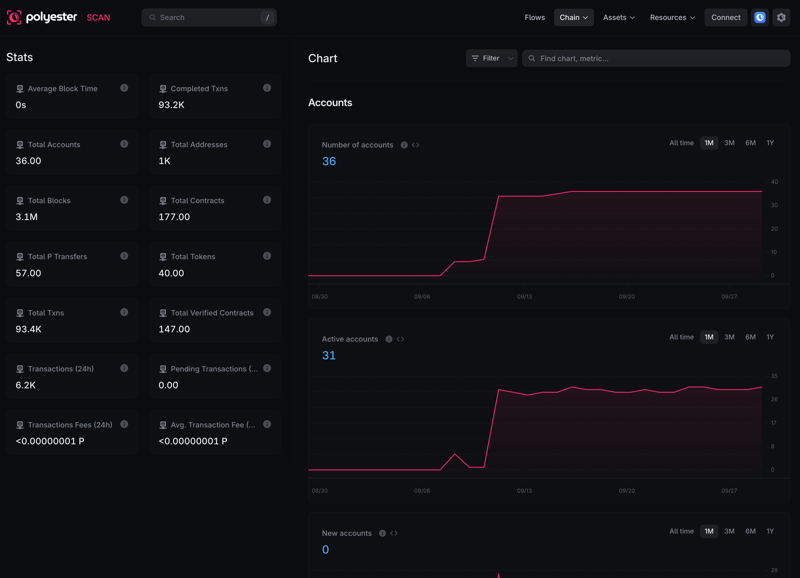 Network statistics and historical charts. Testnet data.
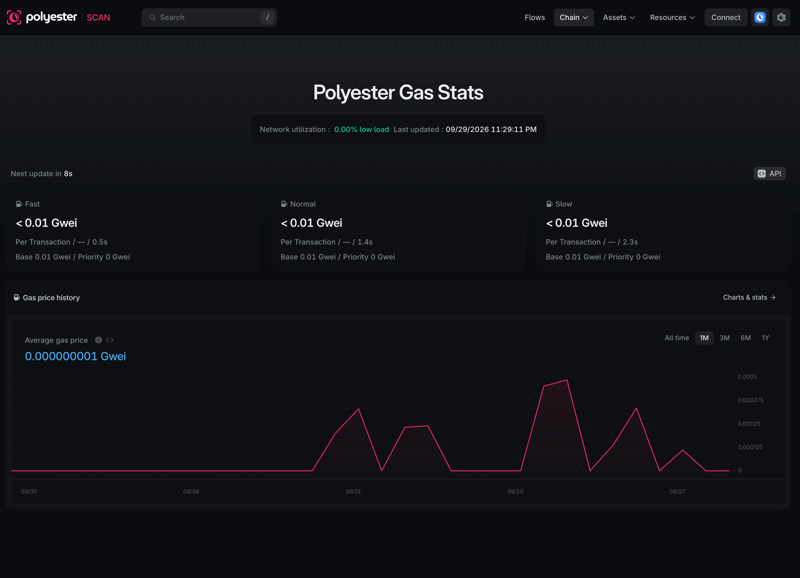 Compare gas estimates and inspect gas-price history. Testnet data.
Visibility without giving up your privacy
We believe you should be able to see how funds move through the ecosystem while keeping your trading activity private. That boundary is part of how we've built Polyester Scan.
Anyone can browse public chain records and the public information associated with supported Flows without connecting an account. Your private Unified Trading Account balances, orders, fills, permissions, sessions, and complete financial ledger remain outside that public view. The public record of a deposit or withdrawal doesn't reveal everything you do on the exchange.
We've made room for the smaller details that make an explorer comfortable to use, too: your timezone, date and number formatting, address display, and light or dark appearance. That makes it easier to compare records across an investigation using consistent timestamps and identifiers.
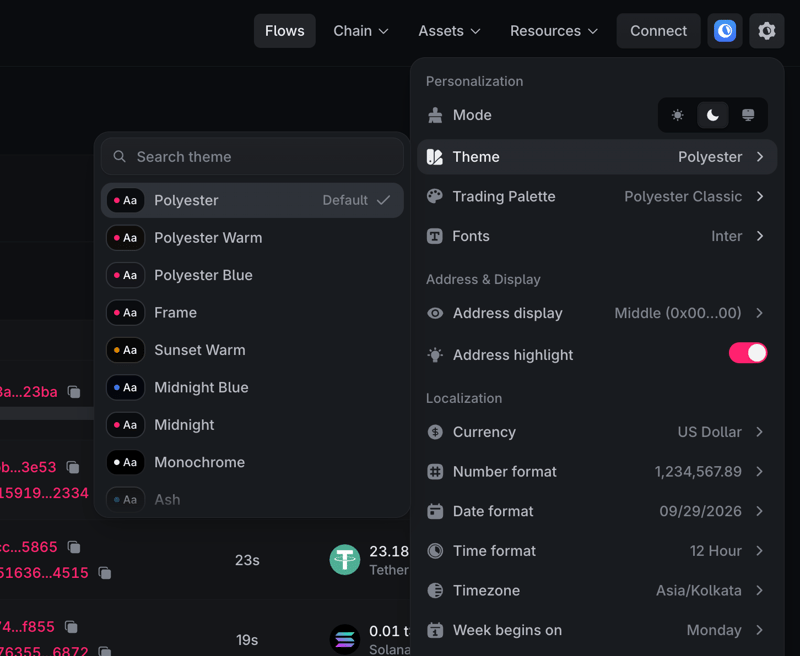 Set the display and formatting preferences that suit your workflow.
We're excited for you to try it
A lot of the work behind Polyester Scan went into connecting things that would otherwise leave you piecing the story together yourself: the external transaction, the confirmations, the account credit, the withdrawal, and the destination.
Building the interface and Polyester-specific journeys from the ground up gave us the freedom to rethink that experience. Flows are one of the clearest examples of what we wanted to change, and we're excited to finally put that work in your hands.
Open Polyester Scan, take a look at the active Flows, and follow a deposit or withdrawal from start to finish. If you'd like a closer walkthrough of the tools, we've put together a Polyester Scan guide as well.
We'd love to hear what you think!
With <3 from - the Polyester team