Introducing the Mini Player for Polyester Chart
Pop Polyester Chart out into a Mini Player and keep your candles in view while you browse other tabs, websites, or markets. Try it on Polyester Testnet today.
Polyester Chart now has a Mini Player. One click in the chart's toolbar pops the chart out of the trading page and keeps it on screen. Check your balances, make a deposit, browse other websites, or look at other markets for your next trade while the candles keep moving beside you.

Read repliesIntroducing the Mini Player for Polyester Chart. Now you can pop out the Mini Player from your browser, and browse other websites and tabs while still seeing your chart and candles. You can also browse multiple charts on Polyester at the same time. Try it out on Testnet today!
Open the Mini Player
The "Miniplayer" button sits in the Polychart toolbar on every spot market pair, at the end of the row just before the fullscreen button. It's there whenever "Polychart" is the selected chart. The "TradingView" chart doesn't have it.
Click it and, if your browser supports floating windows, the chart pops out into its own small window. That window stays on top of your other windows, so you can keep watching the market while you use other websites, browser tabs, or apps. If your browser can't float the chart outside Polyester, the Mini Player opens inside Polyester instead: a small player in a corner of the screen that stays open as you move between Polyester pages. Drag it by its header to another corner, click "Expand chart" to return to the market you opened it from, or click "Close mini-player".
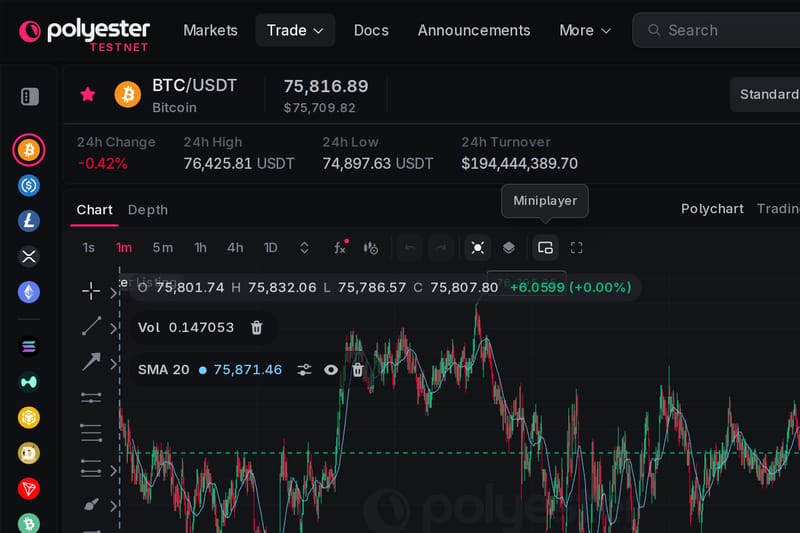 The Miniplayer button sits at the end of the Polychart toolbar.
Return to the Tab or Close the Player
The pop-out window uses your browser's own controls: one closes the window and takes you back to the Polyester tab, the other just closes it. Either way, the chart goes back into the trading page.
While the chart is popped out, its panel on the trading page shows "Chart is in the mini-player" with a "Restore chart" button. Click "Restore chart" to close the pop-out from the trading page.
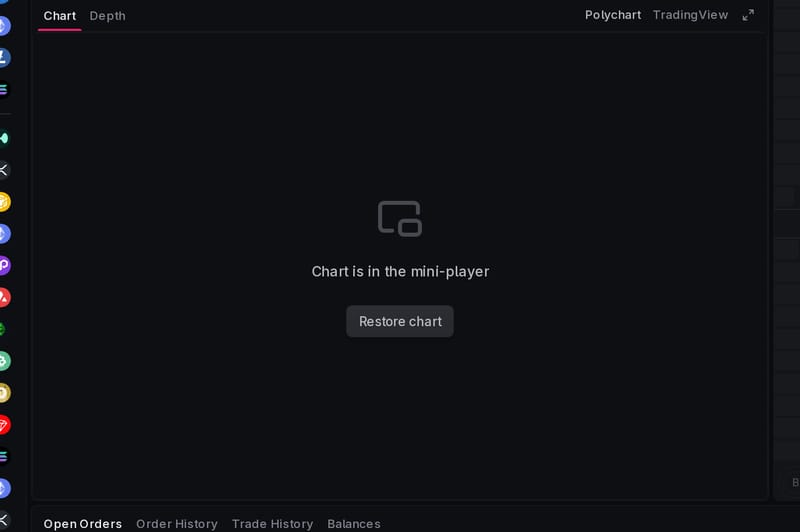 While the chart is popped out, its panel offers to restore it.
The Same Chart, Wherever It Is
The Mini Player isn't a separate chart. It shows the chart you were looking at on the trading page, at the same zoom. You can change the time frame, add, edit, or hide indicators, and draw on it, just as you would on the trading page. Every change carries back: when the chart returns to the trading page, it has the time frame, indicators, and drawings you set in the Mini Player.
Watch Two Markets at Once
The Mini Player keeps the pair you opened it from. Switch the trading page to another market and the page shows that market's chart, so you can follow two charts on Polyester at the same time: one in the Mini Player and one on the trading page.
This doesn't mean several Mini Players. Only one runs at a time: if you open the Mini Player again from another market, it switches to the new pair.
Try It
Open a Market
Go to a spot market such as BTC/USDT and, with the Chart tab open, select Polychart in the chart panel's header.
Pop the Chart Out
Click Miniplayer at the end of the Polychart toolbar. If your browser supports floating windows, the chart opens in its own window. Otherwise it opens in a player inside Polyester.
Go Do Something Else
Use other websites and apps on your laptop or desktop: switch tabs, watch a video, or check your messages. When your browser supports floating windows, the chart stays on top of them, so the candles keep moving in view. If your browser can't float the chart outside Polyester, the Mini Player stays with you as you move between Polyester pages.
Bring It Back
Use the floating window's control to go back to the tab, click Expand chart in the player inside Polyester, or click Restore chart on the trading page.
To learn more about candles, time frames, indicators, and drawings, read the Polyester Chart guide.